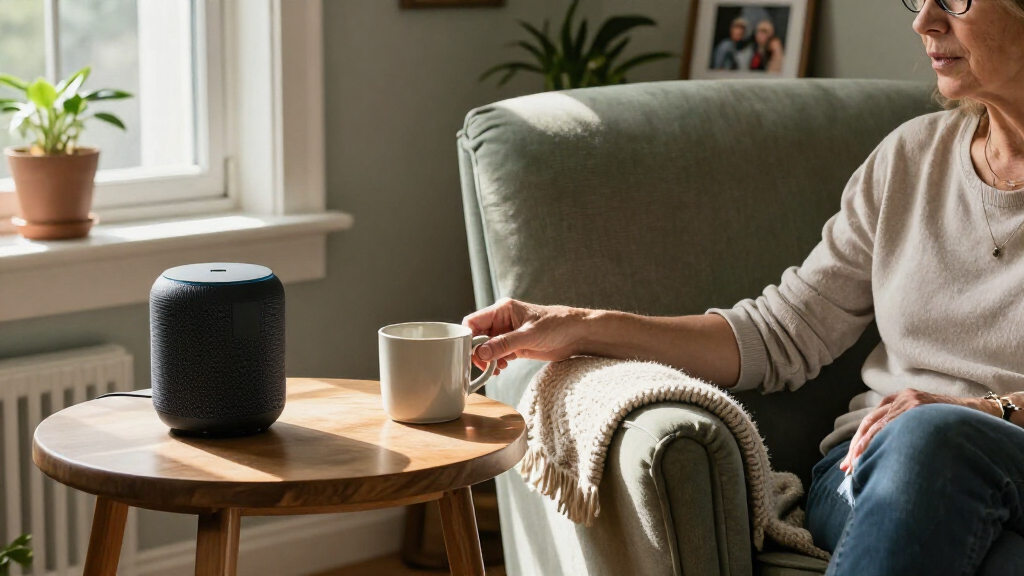

The Amazon Echo Dot (5th Gen) is my best overall pick for seniors who want a familiar voice assistant in a compact, audio-first speaker. The Echo Show 5 adds a screen for calls, timers, and glanceable information, while the Google Nest Mini suits households already using Google services. The main tradeoff is whether a senior will benefit more from simple voice-and-audio controls or a display that adds visual help but also more setup. Sound quality, ecosystem compatibility, and privacy controls also separate these options. Read on for my full comparison and guidance on choosing a speaker that fits the person and their home.

Get comfort and care essentials delivered free — and shop member deals
- Fast, free delivery on millions of items
- Access to Prime Big Deal Days deals on October 6–7
- Prime Video, Amazon Music and more included
Complete the kit


Key Takeaways
- The Echo Dot (5th Gen) leads for everyday simplicity: it offers a familiar Alexa experience without requiring the user to learn a screen interface.
- Displays serve different needs: the Echo Show 5 is a compact choice for visual prompts and video calls, while the larger Echo Show 11 gives more screen space but takes up more room.
- Voice assistant compatibility can outweigh speaker features: the Nest Mini makes the most sense for amazon.com/dp/B0BFCBKXWL?tag=caregiver-information-20&ascsubtag=dc-1161060″ target=”_blank” rel=”nofollow sponsored noopener”>amazon.com/dp/B0DC91H3JK?tag=caregiver-information-20&ascsubtag=dc-1161060″ target=”_blank” rel=”nofollow sponsored noopener”>amazon.com/dp/B0CGYFYY34?tag=caregiver-information-20&ascsubtag=dc-1161060″ target=”_blank” rel=”nofollow sponsored noopener”>Google-centered homes, while several other picks use Alexa.
- Audio-first does not always mean easiest: the Sonos Era 100 emphasizes listening quality, but its added setup and feature set may be more than a first-time user needs.
- Specialist and lesser-known models need closer checking: the amazon.com/dp/B09B93ZDG4?tag=caregiver-information-20&ascsubtag=dc-1161060″ target=”_blank” rel=”nofollow sponsored noopener”>amazon.com/dp/B0GQYW153Z?tag=caregiver-information-20&ascsubtag=dc-1161060″ target=”_blank” rel=”nofollow sponsored noopener”>Third Reality Dev Edition and AI Smart Speaker 10W may suit specific setups, but buyers should verify support, services, and ongoing usability before choosing them over established options.
| Third Reality Voice/Music Assistant Dev Edition |  | Best for Home Assistant Users | Processor: Quad-core ARM A53 | RAM: 256 MB | Flash storage: 512 MB | VIEW LATEST PRICE | See Our Full Breakdown |
| Amazon Echo Dot (5th Gen) Smart Speaker with Alexa, Deep Sea Blue |  | Best Overall for Everyday Voice Help | Generation: 5th Gen | Speaker driver: 1.6 in full-range driver | Playback: Mono | VIEW LATEST PRICE | See Our Full Breakdown |
| Amazon Echo Dot Max Smart Speaker with Alexa, Graphite |  | Best for Stronger Sound and Smart-Home Control | Dimensions: 4.27 × 4.27 × 3.9 in | Weight: 17.82 oz | Drivers: 1 × 0.8 in tweeter; 1 × 2.5 in woofer | VIEW LATEST PRICE | See Our Full Breakdown |
| Google Nest Mini (2nd Generation) Smart Speaker with Google Assistant, Charcoal |  | Best Compact Google Assistant Pick | Generation: 2nd | Connectivity: Bluetooth | Bluetooth range: 10 meters | VIEW LATEST PRICE | See Our Full Breakdown |
| Amazon Echo Show 11 Smart Display, Full HD, Graphite |  | Best for Video Calls and Visual Prompts | Display: 10.95-inch Full HD touchscreen, 1920 × 1200 | Dimensions: 10 × 5 × 7.2 in | Weight: 45.92 oz | VIEW LATEST PRICE | See Our Full Breakdown |
| Sonos Era 100 Wireless Smart Speaker, Black |  | Best for Better-Sounding Alexa Audio | Voice control: Amazon Alexa | Connectivity: Wi-Fi, Bluetooth, and 3.5 mm line-in with adapter | Audio: Stereo sound, bass boost, and Trueplay tuning | VIEW LATEST PRICE | See Our Full Breakdown |
| Amazon Echo Spot Smart Alarm Clock with Alexa, Glacier White |  | Best Bedside Voice Assistant | Display: 2.83-inch touchscreen, 240 × 320 pixels | Speaker: 1.73-inch full-range built-in speaker | Camera: None | VIEW LATEST PRICE | See Our Full Breakdown |
| AI Smart Speaker 10W Voice Control |  | Best Portable Clock-Speaker Concept | Item type: AI smart speaker | Voice control: Voice-activated AI assistant integration; assistant not specified | Maximum output power: 1 W listed in specifications | VIEW LATEST PRICE | See Our Full Breakdown |
| Amazon Echo Show 5 Smart Display, Cloud Blue |  | Best for Visual Reminders and Video Calls | Display: 5.5 inches | Camera: 2 MP | Voice assistant: Alexa | VIEW LATEST PRICE | See Our Full Breakdown |
| voice controlled smart speakers for senior | Dimensions | Weight |
|---|---|---|
| Third Reality Voice/Music Assi | 2.56 × 2.56 × 2.56 in | — |
| Amazon Echo Dot | 3.9 × 3.9 × 3.5 in | 10.7 oz |
| Amazon Echo Dot Max Smart Spea | 4.27 × 4.27 × 3.9 in | 17.82 oz |
| Google Nest Mini | 4 × 4 × 2 in | 1 lb |
| Amazon Echo Show 11 Smart Disp | 10 × 5 × 7.2 in | 45.92 oz |
| Sonos Era 100 Wireless Smart S | 7 × 5.1 × 7.22 in | 2020 g |
| Amazon Echo Spot Smart Alarm C | 4.5 × 4.1 × 4.4 in | 14.3 oz (405 g) |
| AI Smart Speaker 10W Voice Con | 5.12 × 3.94 × 3.15 in | 415 g / 14.64 oz |
| Amazon Echo Show 5 Smart Displ | — | — |
More Details on Our Top Picks
Third Reality Voice/Music Assistant Dev Edition
I’d choose the Third Reality Voice/Music Assistant Dev Edition for a senior whose household already uses Home Assistant and has someone available to configure it. Its preloaded voice and music assistants, dual microphones, and local-processing focus suit a setup built around privacy and custom smart-home routines. Unlike the Echo Dot (5th Gen), it is not a mainstream, ready-to-go Alexa speaker; it asks more of the person setting it up and has a smaller ecosystem. The built-in 3 W speaker can speak responses and play audio without extra equipment, but its compact size limits room-filling sound. I’d also factor in its 2.4 GHz-only Wi-Fi and lack of Bluetooth or Ethernet before choosing it for an older adult who needs uncomplicated support.
Pros:- Comes preloaded with Home Assistant Voice Assistant and Music Assistant
- Dual digital microphones support voice interaction and button activation
- Built-in speaker provides spoken responses and direct audio playback
- Open-source Linux platform supports local processing and customization
Cons:- Home Assistant setup and maintenance may require technical help
- Only supports 2.4 GHz Wi-Fi and has no Bluetooth or Ethernet
- Small 3 W speaker is less suited to louder rooms or music listening
Best for: Seniors in a Home Assistant household, with a technically confident family member or caregiver to handle setup and ongoing configuration
Not ideal for: Buyers who want mainstream voice assistance with minimal setup, stronger room audio, or Bluetooth playback
- Processor:Quad-core ARM A53
- RAM:256 MB
- Flash storage:512 MB
- Speaker:3 W / 4 Ω
- Microphones:Dual digital microphones
- Connectivity:2.4 GHz Wi-Fi
- Operating system:Linux (Home Assistant OS)
- Dimensions:2.56 × 2.56 × 2.56 in
Our verdict“Choose it for a senior in a Home Assistant home who has reliable technical support, not as a plug-and-play alternative to an Echo Dot.”
Amazon Echo Dot (5th Gen) Smart Speaker with Alexa, Deep Sea Blue
For a senior who wants voice help without adding a screen, I’d start with the Echo Dot (5th Gen). Alexa handles common requests such as timers, questions, audio playback, and compatible smart-home controls, while the microphone-off button offers a direct privacy control. Its dual-band Wi-Fi and Bluetooth make it more flexible for everyday use than the Wi-Fi-only Third Reality Voice/Music Assistant Dev Edition, and its familiar Alexa ecosystem may be easier for family members to support. The Dot’s motion and temperature sensors can also support routines, though setting those up may take help. Its mono 1.6-inch driver is a practical fit for voice and casual listening, not a substitute for the fuller sound of the Echo Dot Max.
Pros:- Alexa supports hands-free questions, timers, audio, and compatible smart-home controls
- Microphone-off button provides a straightforward way to disable listening
- Dual-band Wi-Fi and Bluetooth offer flexible connectivity
- Motion and temperature sensors can support household routines
Cons:- Mono speaker is less suited to room-filling or detailed music playback than the Echo Dot Max
- Some skills and services may require subscriptions or additional fees
- eero Built-in requires compatible eero equipment and setup
Best for: Seniors who want a compact, screen-free speaker for voice requests, reminders, casual audio, and compatible smart-home control
Not ideal for: People who need a large visual display, stronger music playback, or features that work without Wi-Fi and account setup
- Generation:5th Gen
- Speaker driver:1.6 in full-range driver
- Playback:Mono
- Wi-Fi:Dual-band 802.11a/b/g/n/ac, 2.4 and 5 GHz
- Smart-home compatibility:Wi-Fi, Bluetooth Low Energy Mesh, Matter
- Dimensions:3.9 × 3.9 × 3.5 in
- Weight:10.7 oz
- Color:Deep Sea Blue
Our verdict“Choose the Echo Dot for an approachable, screen-free Alexa speaker; pick the Echo Show 11 if visible information and video calls matter more.”
Amazon Echo Dot Max Smart Speaker with Alexa, Graphite
I’d put the Echo Dot Max ahead of the Echo Dot (5th Gen) for seniors who want Alexa in a larger room and expect to connect more smart-home devices. Its separate woofer and tweeter, plus space-adapting audio, are designed to give spoken responses and music more presence than the smaller Dot’s single driver. A built-in hub for Zigbee, Matter, and Thread can also reduce the need for separate control hardware, though device setup still takes work. This isn’t the simplest pick in the lineup: the Echo Dot (5th Gen) is smaller and more straightforward for basic voice requests, while the Dot Max adds compatibility options and eero extension that depend on suitable equipment. I’d skip it if the priority is a minimal, low-complexity speaker rather than fuller sound and connected-home features.
Pros:- Woofer and tweeter provide a fuller playback setup than the Echo Dot (5th Gen)
- Built-in Zigbee, Matter, and Thread hub supports a range of compatible devices
- Presence and temperature sensing can support smart-home routines
- Supports multi-room pairing and Fire TV home-theater pairing
Cons:- Smart-home setup can be more involved than using the basic Echo Dot
- eero Wi-Fi extension requires a compatible router and account setup
- Some Bluetooth and connected-device controls have compatibility limits
Best for: Seniors who want more substantial Alexa audio and have, or plan to add, compatible smart-home devices
Not ideal for: Buyers seeking the smallest, simplest speaker for occasional questions and reminders, or those without compatible eero equipment who expect Wi-Fi extension
- Dimensions:4.27 × 4.27 × 3.9 in
- Weight:17.82 oz
- Drivers:1 × 0.8 in tweeter; 1 × 2.5 in woofer
- Playback:Two-way mono
- Wi-Fi:Wi-Fi 6E (IEEE 802.11ax)
- Bluetooth:Bluetooth Low Energy 5.3
- Smart-home hub:Zigbee, Matter, and Thread Border Router
- Processor:AZ3 with AI Accelerator
Our verdict“Choose the Echo Dot Max if sound and built-in smart-home connections matter more than the simpler setup of the Echo Dot (5th Gen).”
Google Nest Mini (2nd Generation) Smart Speaker with Google Assistant, Charcoal
The Google Nest Mini (2nd Generation) is the compact choice for a senior who prefers Google Assistant or wants voice help on a shelf or countertop without a display. Its small footprint makes placement easier than with the larger Echo Show 11, and support for English, Spanish, French, and Portuguese gives households a choice of listed languages. Bluetooth adds another way to connect audio, while voice assistance and smart-home control cover the basics. The tradeoff is that the Nest Mini needs a power outlet and offers none of the Echo Show 11’s visual prompts or video calling. The supplied information also gives no speaker-driver or audio-output detail, so I wouldn’t pick it over the Echo Dot Max for someone who prioritizes stronger music playback.
Pros:- Compact body fits shelves, countertops, and other small spaces
- Supports voice assistance, music streaming, and smart-home control
- Bluetooth provides an additional audio connection option
- Lists support for English, Spanish, French, and Portuguese
Cons:- Requires a corded power connection
- No display for visual information or video calls
- Not water resistant, limiting placement near wet areas
Best for: Seniors who prefer Google Assistant, have limited space, and mainly want spoken help and basic smart-home control
Not ideal for: People who want a screen for visual prompts or video calls, strong music performance, or a speaker they can use away from an outlet
- Generation:2nd
- Connectivity:Bluetooth
- Bluetooth range:10 meters
- Dimensions:4 × 4 × 2 in
- Weight:1 lb
- Power:Corded electric
- Mounting type:Tabletop
- Language support:English, Spanish, French, and Portuguese
Our verdict“Choose the Nest Mini for a small, Google Assistant-based setup, but choose the Echo Show 11 if visual information or video calls are important.”
Amazon Echo Show 11 Smart Display, Full HD, Graphite
I’d choose the Echo Show 11 for a senior who benefits from seeing information as well as hearing Alexa’s response. Its 10.95-inch Full HD touchscreen gives the speaker a clear advantage over the audio-only Echo Dot (5th Gen) for viewing content, photos, and on-screen information. The 13 MP auto-framing camera supports video calls, while camera and microphone privacy controls offer ways to limit access. Its built-in Zigbee, Matter, and Thread hub adds smart-home options, and presence sensing can support routines. The tradeoff is size: at nearly 46 ounces, it is less convenient to move than the compact Nest Mini and needs a stable, suitable place to stay. It also asks more of a buyer than a screen-free speaker, especially if touch controls and video calls aren’t needed.
Pros:- Large Full HD touchscreen displays information and content
- 13 MP camera with auto framing supports video calls
- Camera and microphone privacy controls give users direct control
- Built-in Zigbee, Matter, and Thread hub supports compatible smart-home devices
Cons:- Its 45.92 oz weight makes it less convenient to move than the Nest Mini
- Camera and touchscreen add complexity for people who only want spoken assistance
- Requires a suitable fixed surface and power connection
Best for: Seniors who want a large visual interface, video calls with family, and voice control in a fixed spot at home
Not ideal for: Buyers who need a portable or screen-free speaker, or who do not want a camera-equipped device
- Display:10.95-inch Full HD touchscreen, 1920 × 1200
- Dimensions:10 × 5 × 7.2 in
- Weight:45.92 oz
- Camera:13 MP with auto framing
- Audio:1 × 2.8-inch woofer and 2 full-range drivers
- Wi-Fi:Wi-Fi 6E (IEEE 802.11ax)
- Bluetooth:Version 5.4
- Smart-home connectivity:Zigbee, Matter, and Thread Border Router
- Sensors:Ambient temperature, ambient light, and presence detection
Our verdict“Choose the Echo Show 11 for a stationary Alexa setup where visual prompts and family video calls are more useful than a compact speaker.”
Sonos Era 100 Wireless Smart Speaker, Black
I’d choose the Sonos Era 100 for a senior who values fuller music and spoken-word audio over a screen or bedside clock. Its stereo sound and rich bass give it a stronger audio focus than the compact Echo Spot, while Alexa voice control can handle requests without needing to reach for a phone. Wi-Fi and Bluetooth offer flexible ways to stream, and Trueplay tuning adjusts sound to the room. The tradeoff is that this is less of an all-purpose bedside helper: it has no display, and connecting a wired audio source requires a separate Sonos Line-In Adapter. I’d also place it away from bathrooms or other damp areas because it is not water resistant. Choose it for listening quality, not visual prompts.
Pros:- Stereo sound and rich bass suit music and spoken-word listening.
- Alexa voice control supports hands-free requests.
- Wi-Fi and Bluetooth provide flexible streaming options.
- Trueplay tuning adjusts the sound to the room.
Cons:- No display for visible time, weather, or reminders.
- Wired audio input requires a separate Sonos Line-In Adapter.
- Not water resistant.
Best for: Seniors who mainly want Alexa voice control for music, radio, podcasts, and audiobooks, with richer sound than a small clock speaker.
Not ideal for: People who need a screen for time and weather, want a simple bedside alarm display, or need a speaker for a damp room.
- Voice control:Amazon Alexa
- Connectivity:Wi-Fi, Bluetooth, and 3.5 mm line-in with adapter
- Audio:Stereo sound, bass boost, and Trueplay tuning
- Dimensions:7 × 5.1 × 7.22 in
- Weight:2020 g
- Mounting:Shelf mount
- Water resistance:Not water resistant
- Warranty:1 year
Our verdict“Pick the Era 100 if sound quality matters more than a screen, while the Echo Spot is a better fit for visible bedside information.”
Amazon Echo Spot Smart Alarm Clock with Alexa, Glacier White
The Echo Spot is the most bedside-focused choice here: Alexa handles alarms and routines, while its 2.83-inch touchscreen shows clock faces and useful information such as weather. That visible feedback can help a senior who wants more than a voice-only speaker, without taking up much space. Compared with the Echo Show 5, it skips the camera and larger display, which may suit people who want a simpler, more private alarm clock. Its built-in speaker supports music, podcasts, and audiobooks, but it is a small 1.73-inch driver, so I wouldn’t choose it for room-filling sound. The optional Wi-Fi extension also depends on a compatible eero router and account linking. This is a practical bedside pick, not a substitute for a larger smart display.
Pros:- Touchscreen clock faces show the time and useful information at a glance.
- Alexa supports alarms, routines, weather updates, and compatible smart home controls.
- No camera, with a dedicated microphone-off button.
- Built-in speaker plays music, podcasts, and audiobooks.
Cons:- The small built-in speaker is less suited to filling a larger room than the Sonos Era 100.
- Wi-Fi extension requires a compatible eero router and account linking.
- Some Bluetooth devices and hands-free control scenarios are not supported.
Best for: Seniors who want Alexa alarms, routines, and glanceable time or weather in a compact bedside device without a camera.
Not ideal for: Buyers who want strong room-filling audio, video calls, or a larger screen for viewing content.
- Display:2.83-inch touchscreen, 240 × 320 pixels
- Speaker:1.73-inch full-range built-in speaker
- Camera:None
- Wi-Fi:Dual-band 802.11a/b/g/n/ac, 2.4 and 5 GHz
- Bluetooth:A2DP audio streaming and AVRCP voice control
- Dimensions:4.5 × 4.1 × 4.4 in
- Weight:14.3 oz (405 g)
- eero extension:Up to 1,000 sq. ft. additional coverage with a compatible eero router
Our verdict“Choose the Echo Spot for a compact Alexa bedside clock with visible information and no camera, rather than for premium sound or video calling.”
AI Smart Speaker 10W Voice Control
This speaker’s appeal is its built-in clock display and rechargeable battery, a combination that can suit someone who wants timekeeping and portable audio in one small device. Its listed 415 g weight and Type-C charging make it easier to move than the shelf-oriented Sonos Era 100. But I would be cautious about choosing it as a senior’s main voice assistant: the listing says it supports voice-activated AI assistants without naming the assistant or explaining how setup works. There is also a notable mismatch in the supplied audio details: the title and description say 10 W, while the specifications list 1 W maximum output. That figure, plus the small driver, makes it a weaker bet for a larger room. It may suit someone prioritizing portability, but the clearer Alexa features of the Echo Spot are easier to evaluate.
Pros:- Built-in digital clock display combines timekeeping with speaker functions.
- Built-in 1200 mAh battery supports portable use.
- Bluetooth range is specified up to 10 m.
- Type-C charging port.
Cons:- The product information does not identify which voice assistant is supported or explain setup.
- Specifications list 1 W maximum output despite the 10 W product title and description.
- Small driver and stated output may limit listening volume in larger rooms.
Best for: A buyer seeking a portable clock speaker with Bluetooth and a built-in battery, who is comfortable confirming assistant compatibility and setup before purchase.
Not ideal for: Seniors who need a clearly specified, dependable voice assistant, louder sound for a large room, or established smart-home controls.
- Item type:AI smart speaker
- Voice control:Voice-activated AI assistant integration; assistant not specified
- Maximum output power:1 W listed in specifications
- Speaker driver:57 mm / 2.24 in
- Battery:Built-in 1200 mAh Li-ion
- Charging port:Type-C
- Bluetooth range:Up to 10 m
- Dimensions:5.12 × 3.94 × 3.15 in
- Weight:415 g / 14.64 oz
Our verdict“Consider this portable clock speaker only if battery-powered use is a priority and you can confirm its assistant compatibility and output before buying.”
Amazon Echo Show 5 Smart Display, Cloud Blue
I’d pick the Echo Show 5 for a senior who benefits from seeing weather, news, photos, or compatible smart-home camera views alongside Alexa voice control. Its 5.5-inch display makes it more visually capable than the Echo Spot, and the built-in camera adds video calling for contacts using the Alexa app or a screen-equipped Echo. That extra functionality comes with a privacy tradeoff: this model has a camera, although it includes a physical shutter and microphone-and-camera off button. It is also more dependent on compatible services and devices than a screen-free speaker such as the Sonos Era 100. I’d favor the Show 5 when visual information and calling matter; for a bedside clock without a camera, the Echo Spot is the simpler choice.
Pros:- 5.5-inch display shows news, weather, videos, and photos.
- Alexa voice control works with compatible smart-home devices.
- Built-in 2 MP camera supports video calls and camera viewing.
- Camera shutter and microphone-and-camera off button provide physical privacy controls.
Cons:- Video calls are limited to contacts using the Alexa app or a screen-equipped Echo.
- Some camera and smart-home functions require compatible devices.
- The built-in camera may not suit people who prefer a camera-free bedside device like the Echo Spot.
Best for: Seniors who want a compact Alexa display for visual updates, compatible smart-home controls, and video calls with supported contacts.
Not ideal for: People who prefer a camera-free device, do not have compatible video-call contacts, or mainly want music-focused audio.
- Display:5.5 inches
- Camera:2 MP
- Voice assistant:Alexa
- Color:Cloud Blue
- Smart home:Compatible smart-home device support
- Privacy controls:Camera shutter and microphone-and-camera off button
- Recycled materials:Fabric yarn and aluminum made from 100% recycled materials
- Packaging:100% recyclable
Our verdict“Choose the Echo Show 5 if visual updates and supported video calls are useful, but choose the Echo Spot for a camera-free bedside assistant.”

How We Picked
I ranked these speakers around the day-to-day needs behind voice-controlled use for seniors: clear, practical voice interaction; accessible controls; suitable sound and form factor; and how much setup or ongoing management the device may ask of its owner. I also weighed whether the screen improves independence or adds complexity, and whether the speaker fits common Alexa or Google households. For less familiar or specialist devices, I gave extra weight to how clearly their intended use and support needs are established.
The order favors options with a straightforward role and a recognizable ecosystem, then separates picks aimed at visual communication, richer audio, compact bedside use, or specialist setups. That means a more capable speaker does not automatically rank higher: extra features are useful only when they match the buyer’s needs. I also account for tradeoffs such as screen size, ecosystem limits, setup demands, and the possibility that a device may be harder to maintain or verify than a mainstream alternative.
Factors to Consider When Choosing Voice Controlled Smart Speakers For Seniors
Choosing a speaker for an older adult is less about counting features and more about matching the device to daily routines, hearing, vision, confidence with technology, and the support available at home. I would settle those practical questions before comparing audio specifications.
Start With the Person’s Existing Voice Assistant
Find out whether the household already uses Alexa, Google Assistant, or connected devices built around one of them. A speaker that matches an existing setup can reduce account creation, duplicated apps, and confusion about which wake phrase to use. Do not assume that two speakers with similar voice controls can share routines or smart-home devices seamlessly. If family members will help remotely, ask which assistant they already know how to manage. For a home with no established ecosystem, choose the platform the intended user’s support person can maintain rather than the one with the longest feature list.
Choose a Screen Only When It Solves a Real Problem
A display can make a timer, caller, or reminder easier to recognize, and video calling may help someone who prefers seeing the person they are speaking with. It can also introduce more menus, visual notifications, and privacy questions than an audio-only speaker. Think about eyesight, glare, viewing distance, and where the device will sit before choosing a screen size. A larger display is not automatically easier if it is placed across the room or requires frequent tapping. If the user mainly wants music, questions, and simple reminders, an audio-first device may be simpler to live with.
Check Hearing, Room Size, and Placement Together
Speech clarity depends on more than maximum volume: room acoustics, distance, background noise, and the speaker’s position all affect how well a voice response can be heard. A compact speaker can work well on a bedside table but may feel underpowered in a large shared room. Before buying, identify where the device will live and whether the user can hear speech from their usual chair or bed. Avoid hiding a speaker behind objects or placing it beside a television that is often on. If hearing is a concern, check the device’s available sound controls and test the setup in the actual room during the return period.
Make Setup and Ongoing Support Part of the Decision
Most smart speakers depend on Wi-Fi, an account, and a companion app, so the person setting up the device may matter as much as the device itself. Confirm that someone can connect it, update settings, and help if the network or account changes. A less familiar model may have a narrower support community or fewer clearly documented services, even if its headline features sound suitable. Avoid buying a device on the assumption that a family member can configure everything once and never assist again. Favor controls and services that the owner or their regular helper can understand without relying on a complicated routine.
Decide Which Privacy Controls the User Will Actually Use
Microphone mute controls, camera shutters, and call permissions matter most when the household knows how to operate them. A physical mute button can be easier to understand than a setting buried in an app, while a screen with a camera calls for a clear conversation about when video is enabled. If relatives plan to use calling or drop-in features, agree on who can contact the device and how the senior can decline. Do not treat a smart speaker as an emergency response system unless a specific service is supported, configured, and appropriate for that purpose. Choose a setup whose privacy rules can be explained in plain language and revisited when needs change.
Separate Useful Features From Features That Add Work
Music services, smart-home controls, alarms, and reminders can be helpful, but each one can bring another account, permission, or troubleshooting step. Pick two or three tasks the senior is likely to use first, then verify that the speaker supports them in the relevant country and household setup. Do not pay for stronger audio or a larger display if the main goal is a simple spoken timer. On the other hand, a richer speaker can make sense when music is a daily priority and the user will benefit from fuller sound. A good choice is the one that supports a stable routine without asking the owner to learn features they do not want.
Frequently Asked Questions
Should I choose an Alexa speaker or a Google speaker for a senior?
Choose the assistant that best matches the home’s existing devices and the person who will provide help. A Google-centered household may find the Nest Mini easier to fit into familiar services, while the Echo models in this roundup offer several Alexa form factors, including audio-only and display options. Neither platform is automatically simpler for every user, and voice recognition or service availability can vary with setup and location. Check that the intended user can remember the wake phrase and that their helper can manage the companion app. If there is no existing setup, prioritize the assistant the household’s regular support person knows best.
Is a smart display easier for an older adult than a speaker without a screen?
A display helps when seeing a caller, timer, or visual prompt makes a task easier, but it is not inherently more accessible. It can add menus, reflections, touch interactions, and camera privacy decisions. A person who mainly wants to ask questions or play music may find an audio-only speaker less distracting. Consider the user’s eyesight and whether they will look at the display from a comfortable distance. The right choice depends on whether visual information makes a regular task easier enough to justify the added interface.
Can a smart speaker replace a medical alert device or emergency call system?
I would not treat a general-purpose smart speaker as a replacement for a dedicated medical alert or emergency response service. Voice assistants and calling features depend on power, internet access, correct settings, and the user being able to speak and be understood. Their emergency capabilities can differ by device, service, and region, so check the exact terms rather than assuming a spoken request will reach emergency responders. A speaker can still support everyday communication or reminders as a separate tool. If emergency coverage is needed, choose a purpose-built service and confirm how it works in the home.
What should I verify before buying a smart speaker for a relative who lives alone?
Check that the home has reliable Wi-Fi where the speaker will be placed and that someone can set up the account and companion app. Confirm which contacts can call the device, how calls are answered, and whether video or drop-in features are enabled. Ask the relative to try the wake phrase, adjust volume, and use the main task they want before relying on it for daily routines. Set clear expectations about microphone mute controls and what happens during an internet or power outage. A simple support plan can prevent a useful device from becoming an ignored one.
Is a premium speaker worth choosing over a simpler model?
Paying for a more capable speaker makes sense when the added performance matches a frequent need, such as fuller music playback or a larger screen for calls. It brings little benefit if the senior only wants a timer, basic questions, and occasional audio. More features can also mean more setup and extra decisions for the owner or caregiver. Compare the tasks the person will use every week, not the specifications that sound impressive on a product page. For a first smart speaker, a simpler model is often the lower-friction choice unless a specific premium feature solves a clear problem.
Conclusion
For most seniors who want a straightforward voice assistant, I would start with the Amazon Echo Dot (5th Gen) as best overall; it keeps the experience audio-first while using a familiar Alexa setup. The Google Nest Mini is my best value-style choice for a Google household that wants a compact speaker without a display, while the Echo Show 5 is best for beginners who would benefit from visual prompts and a modest screen. For someone who prioritizes music quality and has help with setup, the Sonos Era 100 is the best premium pick. Choose the Echo Show 11 for a larger-screen calling and information setup, or the Echo Spot for a bedside clock-and-speaker role. I would choose the Third Reality Dev Edition or AI Smart Speaker 10W only after confirming that their services, support, and setup fit the intended user. The right pick is the one the senior can comfortably use and the household can reliably support.
Halloween Picks
halloween
As an affiliate, we earn on qualifying purchases.