
To get started with speech-generating devices, begin by customizing your device’s voice options to match your comfort and style, choosing from various pitches and tones. Explore accessible features like eye-tracking or switch controls to make navigation easier. Adjust settings such as screen size and layout to fit your needs. Taking time to personalize your device will make communication more natural and empowering. Keep exploring these options, and you’ll discover how to optimize your experience even further.
Key Takeaways
- Begin by evaluating the user’s communication needs and physical abilities to select suitable device features.
- Customize the voice settings, including pitch, tone, and speed, to create a natural and comfortable communication experience.
- Access and configure accessibility options like alternative input methods and display adjustments for ease of use.
- Practice navigating the device and experiment with settings to optimize usability and confidence.
- Seek professional guidance or training resources to ensure proper setup and effective integration into daily communication.

Speech-generating devices (SGDs) are powerful tools that help individuals with speech impairments communicate effectively. When you start exploring SGDs, one of the first things you’ll notice is how customizable they can be, especially in terms of voice customization. This feature allows you to select a voice that feels most natural and comfortable, whether that’s a high-pitched tone, a deep voice, or even a voice that sounds like someone familiar. Voice customization isn’t just about personal preference; it can considerably boost your confidence and ease of communication. When you have the ability to choose a voice that resonates with you, it makes expressing yourself more authentic and less frustrating. Many devices offer a variety of pre-set voices, and some even allow you to tweak pitch, speed, and tone, giving you the freedom to shape your communication experience. Additionally, understanding accessibility features ensures that your device can be tailored to your physical and cognitive needs for optimal use.
Device accessibility is another critical aspect worth contemplating as you get started with SGDs. These devices are designed to be as user-friendly as possible, but accessibility features ensure that everyone can use them comfortably, regardless of physical or cognitive abilities. For example, if you have limited hand mobility, you might benefit from alternative input methods like eye-tracking, switch controls, or voice commands. Some devices are equipped with adjustable screen sizes, high-contrast displays, and customizable layouts to accommodate your specific needs. Accessibility isn’t just about physical adaptations; it also encompasses ease of setup, intuitive interfaces, and compatibility with other assistive technologies. As you familiarize yourself with a device, you’ll want to explore its accessibility options to customize your experience, making communication less burdensome and more natural.
Getting started involves more than just turning on a device; it’s about tailoring it to suit your unique needs. Voice customization gives you a sense of ownership over your communication, helping you feel more confident when expressing yourself. Simultaneously, guaranteeing device accessibility means you can navigate and operate the device comfortably, which is essential for sustained use. As you experiment with different voice settings and accessibility features, you’ll gain a better understanding of what works best for you. This process might take some time, but it’s worth investing effort into configuring your SGD properly. Remember, the goal is to make communication as seamless and natural as possible. Whether you’re choosing a new voice or adjusting accessibility options, each step brings you closer to a more effective and empowering communication experience.

Talking Keyboards The Wireless Standard – AAC Device for Speech Therapy and Assistive Speaking – AAC Communication Device for Non-Verbal Adults, Speech Impaired Individuals, Post-Operative Patients
✅ 𝐖𝐢𝐫𝐞𝐥𝐞𝐬𝐬 𝐓𝐚𝐥𝐤𝐢𝐧𝐠 𝐊𝐞𝐲𝐛𝐨𝐚𝐫𝐝: Talking Keyboards wireless standard keyboard is perfect for adults and seniors who can type…
As an affiliate, we earn on qualifying purchases.
As an affiliate, we earn on qualifying purchases.
Frequently Asked Questions
What Are the Latest Advancements in Speech-Generating Technology?
Recent advancements in speech-generating technology include improved speech recognition that’s faster and more accurate, even in noisy environments. You’ll notice integrated augmented reality features that enhance communication by providing visual cues and real-time translations. These innovations make it easier for you to interact seamlessly, offering more natural conversations and greater independence. Developers continue to refine these tools, ensuring they’re more intuitive and accessible for diverse needs.
How Do I Choose the Right Device for My Needs?
Choosing the right device is like finding a perfect suit—fit matters. You should consider device features that match your needs and focus on user preferences, such as portability, voice options, and customization. Try different models, ask for demos, and think about how you’ll use the device daily. By aligning features with your personal needs, you’ll find a speech-generating device that feels comfortable and supports your communication goals effectively.
Are There Funding Options or Insurance Coverage Available?
Yes, there are funding options and insurance coverage available for speech-generating devices. You should check with your insurance provider to see if they cover these devices, as many do, especially with proper documentation from your healthcare team. Additionally, explore government assistance programs or grants that support purchasing communication devices. Working with a healthcare professional or device provider can help you navigate these funding options effectively.
Can Speech-Generating Devices Be Customized for Different Users?
Ever wonder if speech-generating devices can truly fit your needs? Yes, they can be customized for different users. You can tailor device customization and incorporate user-specific features to guarantee the device works best for your communication style. This personalization makes it easier to express yourself confidently. So, don’t hesitate to explore options that allow you to adapt the device to your unique preferences and requirements.
How Do I Train Someone to Effectively Use a Speech-Generating Device?
You should focus on peer training and communication strategies to help someone use a speech-generating device effectively. Start by demonstrating how to operate the device, then encourage practice through real-life interactions. Use clear, simple language, and guide them to develop confidence. Incorporate peer support to boost comfort and engagement. Consistent practice, positive reinforcement, and tailoring strategies to their needs are key for successful training.

KCNVLCK AAC Device for Autism – Non Verbal Communication Tools with Touch-Sensitive Buttons, Special Needs Speech Therapy Talking Aids for Kids and Adults, 5-Level Volume Programmable
Empower Self-Expression for All Ages: Touch-sensitive AAC device helps nonverbal children & adults communicate needs and feelings effortlessly….
As an affiliate, we earn on qualifying purchases.
As an affiliate, we earn on qualifying purchases.
Conclusion
Now that you’ve uncovered the world of speech-generating devices, you’re equipped to turn silent thoughts into vibrant conversations, like a painter adding color to a blank canvas. These devices are your bridge across unspoken gaps, transforming your voice into a mighty river that flows freely. Embrace this technology as your trusted companion, revealing new horizons where expression blooms and connections deepen, making every word a brushstroke in the masterpiece of your communication journey.

Adaptive Bite Switch – Glassouse – Hands-Free Accessibility Switch for Assistive Technology, Rehab, Wheelchair, Communication & Gaming Devices | Durable, Easy to Use, Reliable Input Control
HANDS-FREE CONTROL: Perfect solution for individuals needing alternative input—activate devices easily with a bite or gentle pressure, no…
As an affiliate, we earn on qualifying purchases.
As an affiliate, we earn on qualifying purchases.
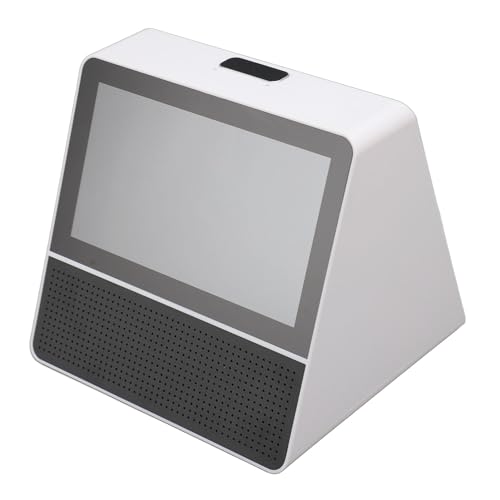
7 Inch Dual Screen Translator 120 Languages Touchscreen Device with Recordings for Business Meetings, Conferences, Travel
[Clear and Vibrant Display] 7 INCH DISPLAY: The double screen translator features a crystal clear 7 inch display…
As an affiliate, we earn on qualifying purchases.
As an affiliate, we earn on qualifying purchases.