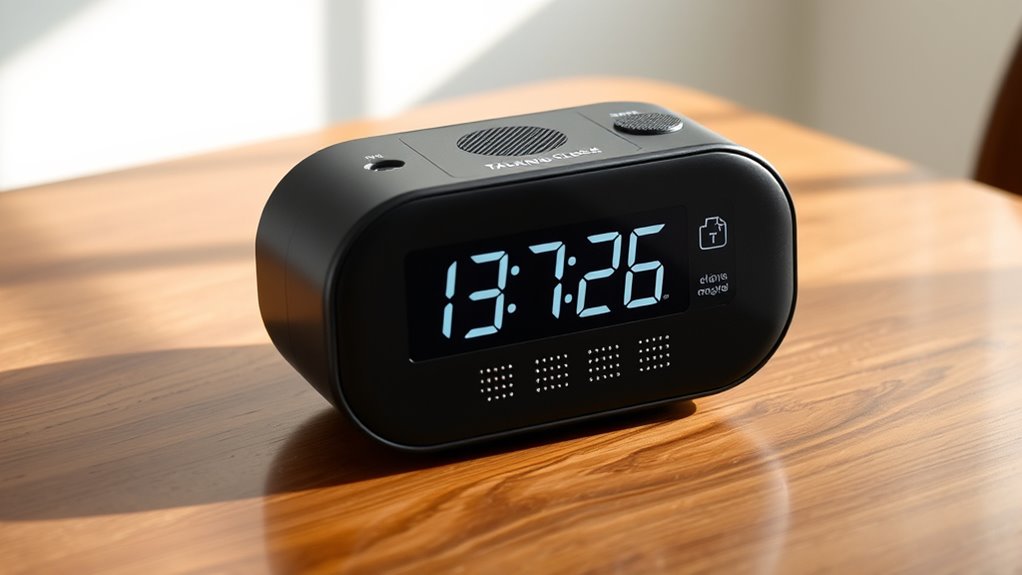

Finding the right talking clock for a visually impaired loved one or yourself can significantly improve daily independence. The best overall pick, the Top Life Talking Clock, offers clear audio and simple operation. For those needing a more customizable experience, the GOLOZA 7” Digital Dementia Clock provides multiple features and volume options. However, tradeoffs include price and complexity—more advanced models tend to cost more and require a learning curve. Keep reading for a detailed breakdown of these options and how to choose the perfect clock for your needs.

Turn quiet afternoons into listening time
- Thousands of audiobooks, podcasts and originals
- Listen on your phone, tablet or Echo — also offline
- Cancel anytime
Complete the kit


Key Takeaways
- High contrast visuals and large displays are critical for users with residual vision alongside audio features.
- Volume control and clarity of voice are decisive factors, especially for users with hearing impairments or in noisy environments.
- Simplicity and ease of operation remain top priorities for elderly users or those with cognitive impairments.
- More feature-rich clocks, such as reminders and multiple display modes, tend to cost more and are better suited for tech-savvy users.
- The design and size of the clock influence portability and ease of placement for different living spaces.


| talking clocks for visually impaired | Size | Color | Voice | Batteries |
|---|---|---|---|---|
| Talking Clock for Visually imp | Large, easy push button | Red | Male North American | 3 AAA (not included) |
| Large Talking Clock for Visual | 4.5" W x 2.5" H | Green+Black | North American English | 3 AAA (included) |
| Talking Clock for Blind Elderl | 4.5 x 2.5 inches | — | North American English | 3 AAA (not included) |
| Talking Large Button Alarm Clo | Large, easy push buttons | White with red accents | Male English | 2 AAA (not included) |
| Memo24 Talking Button Alarm Cl | — | High contrast red button | English male voice | 2 AAA batteries included |
| Talking Clock Button for the B | Approximately 3 inches diameter | — | — | — |
| Extra Large Talking Button Clo | Approx. 4.5" x 2.5" | Blue | Loud male voice | — |
| Large Talking Alarm Clock for | 3.5" x 3.5" x 1.5" | White and blue | — | — |
| GOLOZA 7” Digital Dementia Cl | 7 inches | — | — | — |
| Talking Button Clock for the B | — | Blue and Silver | — | Requires two AAA batteries (not included) |
| Top Life Talking Clock | 6.7" W x 3.8" H | — | — | — |
More Details on Our Top Picks
Talking Clock for Visually impaired, Blind, Elderly. Large and high Contrast (Red)
This large, high-contrast talking clock excels for users with low vision or blindness who need a straightforward device. Its single push button announces both time and date clearly, with a male North American voice that’s easy to understand. Compared to the Top Life Talking Clock, it offers a more minimalistic, no-fuss operation ideal for those who prefer simplicity. However, it lacks volume control and advanced features like alarms or memory functions, which may limit its use for some. Its large, high contrast red design makes it especially suitable for elderly users with dementia or severe vision impairment. Tradeoffs include limited functionality in exchange for straightforward operation.
Pros:- Very simple operation with a single push button
- High contrast red color aids visibility for low vision users
- Clear male North American voice for easy comprehension
- Compact and lightweight for portability
Cons:- No volume adjustment options
- No alarm or reminder functions
- Requires 3 AAA batteries (not included)
Best for: Elderly users with severe vision impairment or dementia who need a simple, reliable talking clock
Not ideal for: Users seeking multiple functions like alarms, date settings, or volume control, which this model does not provide
- Voice:Male North American
- Display:Large, high contrast
- Batteries:3 AAA (not included)
- Functions:Time and date announcement
- Size:Large, easy push button
- Color:Red
Our verdict“This pick is best for users who need a straightforward, easy-to-use talking clock without extra features.”
Large Talking Clock for Visually impaired- Telling Time, Date and Week of Day, Perfect for The Blind, Elderly or Visually impaired-Upgrade Version (Green+Black) (RED+Black)
This upgraded model stands out for its time memory function, allowing the clock to retain settings even after battery replacement—an advantage over simpler models like the Talking Clock for Blind Elderly. Its large, high-contrast display and big buttons make it accessible for users with low vision or dementia. The volume control and clear North American voice improve usability, especially for those with hearing aids. Compared to the Talking Button Clock for the Elderly, it offers more durability and convenience for long-term use without repeated setting. However, its size (4.5″ wide and 2.5″ tall) might be less portable for some. Tradeoffs involve a slightly larger footprint in exchange for consistent, long-lasting operation.
Pros:- Memory function maintains settings after battery change
- Large, high contrast color scheme for visibility
- Volume control for hearing aid users
- Easy to operate with big buttons
Cons:- Relatively larger size may reduce portability
- Requires 3 AAA batteries (included)
- No backlit display for nighttime visibility
Best for: Users who need a clock that can be set once and used long-term without reprogramming, especially those with memory issues
Not ideal for: Individuals seeking a small, highly portable device or those on a tight budget, as this model is slightly bulkier and may cost more
- Voice:North American English
- Display:Large, high contrast
- Batteries:3 AAA (included)
- Functions:Time, date, week of day, alarm with memory
- Size:4.5″ W x 2.5″ H
- Color:Green+Black
Our verdict“This clock is ideal for users who value long-term reliability and memory retention over compactness.”
Talking Clock for Blind Elderly – Voice Announced Time and Date Talking Watches for the Blind and Visually Impaired – High and Low Volume, North American English Voice, Compact 4.5 by 2.5 Inch Design
This compact talking clock combines a wristwatch form factor with voice functionality, making it highly portable for users who need quick access to time and date. Its one-touch button announces time and date clearly, with voice-guided setup that’s suitable for blind users. Compared to larger tabletop models like the Large Talking Clock for Visually Impaired, it offers portability and easy wearing, though it lacks a dedicated alarm feature. Its high and low volume settings improve accessibility, especially for those with hearing aids. The small size (4.5″ x 2.5″) makes it less suitable for users who prefer larger displays or those who need more visual cues. Tradeoffs include limited display size and absence of alarm functions for the benefit of portability.
Pros:- Portable wristwatch form factor
- Voice-guided setup for ease of use
- High and low volume options
- Announces both time and date
Cons:- No alarm function
- Small display size limits visual cues
- Requires 3 AAA batteries (not included)
Best for: Blind or visually impaired individuals who want a portable, wearable solution for time and date
Not ideal for: Users needing a clock with multiple functions like alarms, or those who prefer larger displays for easier reading
- Voice:North American English
- Display:Compact, wristwatch
- Batteries:3 AAA (not included)
- Functions:Time and date announcement
- Size:4.5 x 2.5 inches
- Volume:High and Low
Our verdict“This watch makes sense for users prioritizing portability and quick voice access over multi-functionality.”
Talking Large Button Alarm Clock for Elderly and Visually Impaired
This large button talking clock combines audible time and date announcements with an alarm and calendar, making it versatile for elderly and visually impaired users. Its large, high contrast buttons and clear male voice facilitate easy operation, similar to the Talking Clock for Elderly. Unlike the Talking Clock for Blind Elderly, it adds alarm and calendar functions, suitable for those needing reminders. However, it requires two AAA batteries (not included), and it lacks volume control or backlit display, which could hinder nighttime use. Its straightforward design is perfect for users who want more than just time announcements but do not need complex features. Tradeoffs involve balancing simplicity with added functions, but missing some advanced options.
Pros:- Large, high contrast buttons
- Audible announcements for time and date
- Includes alarm and calendar functions
- Easy setup with audio instructions
Cons:- No volume control
- Requires two AAA batteries (not included)
- No backlit display for night use
Best for: Seniors and visually impaired individuals who want an all-in-one clock with alarms and calendar features
Not ideal for: Users seeking a compact or minimal device without alarm functions or those needing adjustable volume
- Voice:Male English
- Display:Large, high contrast
- Batteries:2 AAA (not included)
- Functions:Time, date, alarm, calendar
- Size:Large, easy push buttons
- Color:White with red accents
Our verdict“This clock suits users who want an accessible, multi-function device with alarm and calendar features in a simple package.”
Memo24 Talking Button Alarm Clock for the Blind and Visually Impaired
This clock stands out for its straightforward design, featuring a large, tactile 2.8-inch button that announces time, date, and day with a single press. Compared with products like the Extra Large Talking Button Clock, the Memo24 offers a more durable build and adjustable volume, making it suitable for elderly users who need clear, simple audio cues. However, it is limited to basic functions and lacks features like multiple alarms or display options, which some users might find restrictive. Its focus on a large, high-contrast red button ensures easy operation for those with limited dexterity or vision. The reliance on two AAA batteries and absence of a digital display are notable tradeoffs, but the device’s simplicity makes it ideal for users seeking a no-fuss, reliable talking clock.
Pros:- Large, tactile 2.8-inch button simplifies operation
- Clear male voice announcements in English
- Adjustable volume for different hearing needs
- High contrast red button enhances visibility
Cons:- Limited to basic time and date announcements
- Requires batteries, no rechargeable option
- No digital display or additional features
Best for: Elderly individuals or first-time users who need a reliable, easy-to-operate clock with minimal features
Not ideal for: Users wanting advanced functions like multiple alarms or custom display options
- Voice:English male voice
- Display:Large 2.8-inch button
- Batteries:2 AAA batteries included
- Color:High contrast red button
- Material:High quality plastic
- Volume control:High and low positions
Our verdict“This pick suits users who prioritize straightforward operation over advanced features or customization.”
Talking Clock Button for the Blind, Elderly or Visually Impaired
This clock is distinguished by its small, circular, lightweight design with a large, easy-to-press tactile button that announces the time aloud. Compared to the GOLOZA 7” Digital Dementia Clock, it is far more portable and simple, perfect for bedside or travel use. Its compact form and built-in speaker make it accessible for users with limited dexterity, but it offers only basic time announcements with no extra features like reminders or display customization. The device requires two AAA batteries (not included) and lacks a backlit display, which limits visual cues. Its straightforward operation makes it an excellent choice for users who need a small, reliable device without complex settings or additional functions.
Pros:- Compact and lightweight for portability
- Large, tactile button for easy operation
- Clear voice announcement of the time
- Built-in speaker with ventilation holes
Cons:- Requires batteries not included
- Limited to basic time announcement only
- No backlit display or visual time indicator
Best for: Individuals seeking a small, easy-to-carry talking clock for simple time announcements
Not ideal for: Users needing advanced features like alarms, reminders, or customizable displays
- Button Type:Large, tactile button
- Power:Requires two AAA batteries
- Design:Circular, compact, lightweight
- Audio Output:Built-in speaker
- Size:Approximately 3 inches diameter
Our verdict“Ideal for users who prefer a small, simple device for quick time checks without extra features.”
Extra Large Talking Button Clock – for The Blind, Elderly or Visually Impaired
This clock is notable for its extra-large, high-contrast blue button that makes operation intuitive for users with low vision, dementia, or limited dexterity. Compared with the Large Talking Alarm Clock for Blind, it offers a bigger, more visible button and simple one-touch operation for announcing the current time or date. Its ease of use is balanced by its limited functions—no multiple alarms or display customization—but it excels in providing clear, loud voice announcements in North American English, making it suitable for users with hearing aids. The device runs on three AAA batteries (not included), and its straightforward design minimizes confusion for users unfamiliar with more complex clocks. It’s best for those prioritizing large, accessible buttons over advanced features.
Pros:- Extra-large, high-contrast blue button simplifies use
- High volume, clear male voice for announcements
- Easy to set with audio instructions
- Simple design for minimal confusion
Cons:- Limited to time and date announcements
- Batteries not included, needs replacement
- No advanced features or display options
Best for: Users with very low vision or cognitive impairments needing a large, simple-to-press button clock
Not ideal for: People looking for multi-function clocks with alarms and customizable displays
- Display Type:Analog
- Additional Features:Alarm
- Power Source:3 AAA batteries required
- Color:Blue
- Size:Approx. 4.5″ x 2.5″
- Voice:Loud male voice
Our verdict“This clock is perfect for those who need a large, high-contrast button for easy operation without extra bells and whistles.”
Large Talking Alarm Clock for Blind – Announces Time, Date, and Day of Week
This clock offers clear, loud voice announcements of time, date, and day of week, making it a good choice for users who need basic auditory cues. Compared with the Extra Large Talking Button Clock, it provides a more comprehensive set of information but relies on a simple design with no extra features like reminders or display customization. Its high-contrast white and blue color scheme enhances visibility for users with low vision, and it is operated with one-touch controls, emphasizing ease of use. The device requires two AAA batteries (not included). It is best suited for users who prioritize straightforward, loud voice announcements over additional functions like alarms or reminders.
Pros:- Loud male voice announcements
- Announces time, date, and day of week clearly
- High-contrast color scheme enhances visibility
- One-touch operation simplifies use
Cons:- Limited to basic functions only
- Requires batteries not included
- No alarm or reminder features
Best for: Users needing a simple, loud announcement clock with time, date, and weekday info
Not ideal for: Those looking for multi-alarm or reminder features or customizable display options
- Display Type:Analog
- Additional Features:Announces time, date, day
- Power:2 AAA batteries required
- Color:White and blue
- Size:3.5″ x 3.5″ x 1.5″
Our verdict“Suitable for users who want a straightforward, loud clock that announces essential time info without extras.”
GOLOZA 7” Digital Dementia Clock, Talking Clock with 10 Volumes, 6 Display with 10 Color Modes, Auto Dimmable, Alarms & Birthday & Holiday Reminders, 3 Pill Reminders Clocks for Seniors
This clock makes a strong impression with its 7-inch LCD display, offering 6 themes, 10 color modes, and auto-dimming, catering to users who want both visual and auditory cues. Compared with the Large Talking Alarm Clock for Blind or the Extra Large Talking Button Clock, it provides a wealth of features like customizable backgrounds, reminders for birthdays, holidays, and pills, plus multiple volume levels. Its advanced options benefit users with cognitive impairments or who need visual aids, but the complexity might be overwhelming for those preferring simple devices. The clock is powered via an included USB cable and adapter, eliminating battery concerns. It’s best for tech-savvy seniors or caregivers seeking a highly adaptable clock with visual and auditory cues combined.
Pros:- Large 7-inch LCD display with auto dimming
- Multiple themes and 10 color modes for customization
- Includes alarms, reminders, and birthday alerts
- Adjustable volume and 10 brightness levels
Cons:- More complex to set up and operate
- Requires an electrical cord (USB), no battery backup
- Could be overwhelming for users needing simple devices
Best for: Tech-savvy seniors or caregivers who want customizable alerts, themes, and visual aids
Not ideal for: Users seeking a simple, no-fuss clock without extensive features or visual customization
- Display Type:LCD
- Additional Features:Alarms, reminders, auto dimming
- Volume Levels:10
- Color Modes:10
- Power Source:USB cable and adapter
- Size:7 inches
Our verdict“Ideal for users who appreciate visual customization and multiple reminders over minimalism or simplicity.”
Talking Button Clock for the Blind, Elderly, or Visually Impaired
This clock stands out for its straightforward operation, featuring a single large button that announces the time and date clearly. Compared with more feature-rich options like the Top Life Talking Clock, it prioritizes ease of use over extra functionalities, making it ideal for users with dementia or very low vision. The high-contrast blue and silver design enhances visibility, and multiple voice volume settings allow customization for different hearing needs. However, its limited feature set—only basic time and date announcements—may leave those seeking alarms or additional info wanting. The requirement for two AAA batteries (not included) adds a minor inconvenience, and the clock lacks advanced features like alarms or screen dimming. This pick makes the most sense for individuals needing a simple, reliable device without complexity, especially those with cognitive impairments or severe visual limitations.
Pros:- Simple one-button operation for ease of use
- High contrast design improves visibility
- Multiple voice volume settings for personalized audio
Cons:- Requires two AAA batteries not included, adding extra step
- Limited to time and date announcements without alarms or reminders
Best for: Users with low vision or dementia who need a straightforward, easy-to-operate clock.
Not ideal for: People looking for alarms, date/week functions, or adjustable display brightness, as these are not included.
- Color:Blue and Silver
- Voice Settings:Super loud, loud, low, super low
- Voice Accent:North American English Male
- Batteries:Requires two AAA batteries (not included)
Our verdict“This clock is perfect for users who need a straightforward, high-contrast talking device with minimal features.”
Top Life Talking Clock – Extra Loud Time and Date – for Elderly, Dementia, Hearing or Visually Impaired Seniors – Easy to Use Speaking Help – Clear Neutral Male Voice
This model excels in delivering a loud, 85 dB voice announcement, making it suitable for users with hearing impairments, and features a large, high-contrast 12/24-hour display that benefits those with partial sight. Compared to simpler clocks like the Talking Button Clock, it offers greater versatility with adjustable volume, brightness, and a snooze function, along with a pleasant wake-up chime. Its dual power options—AC or 3 AA batteries—add flexibility for placement. However, the clock’s size (6.7″ x 3.8″) makes it less discreet and potentially less portable, and the multiple features might feel overwhelming to users new to talking clocks. The absence of a dedicated alarm setting or screen dimming for sleep is a minor shortcoming. Overall, this clock makes the most sense for seniors who need a loud, easy-to-read device with extra comfort features, but less so for those seeking minimalism or portability.
Pros:- Loud 85 dB volume accommodates hearing loss
- Large, high-contrast display enhances readability
- Multiple volume and brightness adjustments for customization
- Flexible power options—AC or batteries
Cons:- Relatively large size reduces portability
- No dedicated sleep mode or screen dimming feature
Best for: Seniors with hearing impairments or those who prefer a large, bright display with adjustable volume and a loud voice.
Not ideal for: Individuals who want a compact, minimalist clock or those seeking a model with built-in alarms and sleep-friendly light controls.
- Display Type:Digital, Large High-Contrast
- Additional Features:Adjustable Brightness, Adjustable Volume, Snooze
- Alarm Clock:Yes
- Power Source:Corded Electric or 3 AA batteries
- Size:6.7″ W x 3.8″ H
- Voice Type:Neutral Male
Our verdict“Ideal for seniors who need a loud, easily visible clock with adjustable settings and a clear voice, but less suitable for those preferring a compact device.”

How We Picked
To select the best talking clocks for visually impaired users, I evaluated each product based on clarity of audio, volume adjustability, ease of use, display size, and overall build quality. Products were also assessed for additional features like date announcements, alarm functions, and customization options, which can enhance independence. Priority was given to devices that prioritize simplicity without sacrificing essential features, as many users value straightforward operation. Ranking was determined by how well each clock balances functionality, accessibility, durability, and value for different user needs.| talking clocks for visually impaired | Voice |
|---|---|
| Talking Clock for Visually imp | Male North American |
| Large Talking Clock for Visual | North American English |
| Talking Clock for Blind Elderl | North American English |
| Talking Large Button Alarm Clo | Male English |
| Memo24 Talking Button Alarm Cl | English male voice |
| Talking Clock Button for the B | — |
| Extra Large Talking Button Clo | Loud male voice |
| Large Talking Alarm Clock for | — |
| GOLOZA 7” Digital Dementia Cl | — |
| Talking Button Clock for the B | — |
| Top Life Talking Clock | — |
Factors to Consider When Choosing Talking Clocks For Visually Impaired
Choosing the right talking clock involves more than just sound quality. Consider your visual and hearing abilities, as these influence what features are most useful. Ease of operation is crucial—complicated controls can frustrate or discourage use. Additional features like multiple alarms, date announcements, and volume control add convenience but can also increase complexity. Think about placement and size, especially if space is limited or mobility is a concern. Balancing these factors will help you find a clock that genuinely improves daily life.Display Size and Contrast
For users with residual sight, a large, high-contrast display enhances visibility. Bright backgrounds with dark numerals or vice versa make reading easier and reduce eye strain. If the user is completely blind, focus on audio clarity instead, but a sizable display can still serve as a visual aid or for caregivers. Be wary of small or color-bland displays, which diminish accessibility.
Audio Quality and Volume Controls
Audio clarity is the backbone of a good talking clock. Devices with adjustable volume and clear, natural voices help users understand the time without strain. Loudness varies among models—some offer extra loud settings suitable for noisy environments or severe hearing loss. Test the voice quality if possible, as some clocks use synthesized speech that may sound robotic or unnatural, impacting comprehension.
Ease of Use and Button Layout
Look for clocks with simple, tactile buttons or voice commands. Overly complex controls can be overwhelming, especially for the elderly or those with cognitive impairments. Features like one-touch time reading or large, textured buttons significantly improve usability. Consider whether the clock’s setup process is straightforward, since complicated instructions can discourage regular use.
Additional Features
Extra functions like date announcements, alarms, and reminders can be valuable, but only if they are accessible. For example, alarms should be easy to set and turn off, preferably with minimal steps. Auto-dimming displays and multiple language options can also enhance usability, especially in different living environments. Weigh these features against price and complexity to find the best fit.
Size, Portability, and Power
Consider where the clock will reside—larger models are easier to read and operate but less portable. For bedside use, a compact, stationary clock is ideal; for travel or multiple rooms, a smaller, battery-operated device makes more sense. Battery life and power source matter, especially if frequent charging or battery replacement becomes inconvenient. Durability and stability are also important for long-term use.
Frequently Asked Questions
Can these talking clocks be used by people with severe hearing loss?
Many talking clocks include volume controls and some offer extra loud settings to accommodate users with hearing impairments. However, if hearing loss is profound, visual cues or vibrating alarms may be necessary supplements. It’s advisable to test the audio output or choose models with adjustable voice pitch and volume to ensure clarity. Combining a talking clock with a visual or vibratory alert system can enhance overall accessibility.
Are these clocks suitable for someone with cognitive impairments or dementia?
Yes, but simplicity is key. Clocks with straightforward controls, minimal features, and clear voice output tend to work best. Devices with large buttons and simple operation reduce confusion and frustration. Some models, like the Top Life Talking Clock, are designed specifically for ease of use, making them suitable for users with cognitive challenges. Avoid clocks with complex menus or too many functions that could overwhelm the user.
Do I need to buy additional accessories for these clocks to be fully accessible?
Most talking clocks are ready to use out of the box, but some may benefit from accessories like extra loud speakers or vibrating pads. For users with severe hearing or vision impairments, pairing the clock with complementary tools like magnifiers or hearing aids can improve usability. Always check if the clock supports external accessories or if it includes features like adjustable volume and contrast to maximize accessibility.
How durable are these clocks for everyday use?
Durability varies across models, with most designed for regular bedside or tabletop placement. Devices with sturdy, impact-resistant cases and stable bases tend to last longer in active environments. Consider the quality of materials and manufacturer reputation when choosing, especially if the clock will see frequent handling or transport. Proper care and occasional maintenance can extend the lifespan of any device.
Is it worth paying more for a feature-rich talking clock?
It depends on the user’s needs. For someone who requires multiple reminders, customizable alarms, or a large display, investing in a feature-rich clock can significantly improve independence. However, more advanced models often come with a learning curve and higher cost. If simplicity and straightforward operation are priorities, a basic model with clear audio and easy controls may provide better value and ease of use.
Conclusion
The best overall choice for most users, especially those who want a reliable and straightforward device, is the Top Life Talking Clock. It offers clear audio, simple controls, and excellent durability. For budget-conscious buyers or those new to talking clocks, models like the Memo24 Talking Button Alarm Clock provide essential features at a lower price point. If you need a device with extensive features and customization, the GOLOZA 7” Digital Dementia Clock makes sense despite its higher cost. Ultimately, selecting the right clock depends on your specific visual, hearing, and cognitive needs—consider what features will most improve your daily routine and choose accordingly.
Fall Picks
fall essentials
As an affiliate, we earn on qualifying purchases.