
Finding a keyboard suitable for seniors involves balancing ease of use, clarity, and comfort. The best options feature large, high-contrast keys and ergonomic designs to reduce strain. The SABLUTE Large Print Wired Keyboard stands out for its clear print and wrist rest, making typing less tiring. Meanwhile, the X9 Large Print Backlit Keyboard offers vibrant lighting for low-light environments. Tradeoffs often involve choosing between lighting features and simplicity—more features can mean more complexity. Continue reading for a detailed breakdown of the best senior-friendly keyboards in 2026.

Turn quiet afternoons into listening time
- Thousands of audiobooks, podcasts and originals
- Listen on your phone, tablet or Echo — also offline
- Cancel anytime
Complete the kit


Key Takeaways
- Large print and high contrast keys significantly improve visibility and reduce errors for seniors.
- Backlit keyboards are helpful in low-light settings but may add complexity or cost.
- Ergonomic features like wrist rests and oversized keys enhance comfort and reduce strain during prolonged use.
- Wired keyboards tend to be more reliable and straightforward, but wireless options add convenience.
- Choosing a keyboard with compatibility for both Windows and Mac broadens usability across devices.
| SABLUTE Large Print Wired Keyboard with Wrist Rest and Phone Holder, Compatible with Windows and Mac, Yellow |  | Best Overall for Readability and Ergonomics | Compatible Devices: Laptop, PC | Connectivity Technology: USB | Additional Features: Ergonomic, Large Print, Phone Holder, Wired, Wrist Rest | VIEW ON AMAZON | See Our Full Breakdown |
| Large Print Computer Keyboard for Elderly and Visually Impaired, 104-Key USB Wired Full-Size QWERTY Black | 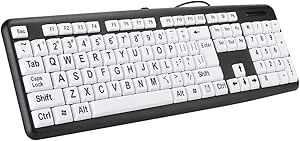 | Best for High Contrast Visibility | Color: Black | Number of Keys: 104 | Connection: Wired USB | VIEW ON AMAZON | See Our Full Breakdown |
| KOPJIPPOM Large Print Keyboard – 7 Interchangeable Backlight Colors, Light Up USB Wired Computer Keyboard |  | Best Customization and Brightness Control | Compatibility: Windows 2000/XP/7/8/10/11, Vista, Raspberry Pi, Mac OS | Backlit Colors: 7 | Power Source: USB | VIEW ON AMAZON | See Our Full Breakdown |
| QUASIO Large Print Ergonomic Keyboard with Wrist Rest, Full Size Wired USB Keyboard with Oversized Keys |  | Best for Comfort and Reduced Eye Strain | Key Size: 4X larger than standard | Connectivity: Wired USB | Cable Length: 5.25 ft | VIEW ON AMAZON | See Our Full Breakdown |
| Large Print Computer Keyboard – High Contrast Black and White Keys for Visually Impaired, Seniors, and Beginners |  | Best Minimalist High Contrast Design | Connectivity: Wired USB | Compatibility: Windows, Mac OS | Key Features: High contrast keys, large lettering, full size | VIEW ON AMAZON | See Our Full Breakdown |
| EDJO Large Print Ergonomic Keyboard with Wrist Rest, Full Size Wired USB Keyboard with Oversized Letters for Easy Typing |  | Best Overall for Comfort and Visibility | Compatibility: Laptop, tablet, Smart TV, PC | Connectivity: USB | Features: Ergonomic, Large Print Keys, Waterproof, Lightweight, Hotkeys, Media Keys | VIEW ON AMAZON | See Our Full Breakdown |
| X9 Large Print Backlit Computer Keyboard – Lighted USB Wired Keyboard with 7-Colors Backlight LED |  | Best for Nighttime Use and Visual Clarity | Compatible Devices: Laptop, PC | Connectivity Technology: USB-A | Backlighting: RGB | VIEW ON AMAZON | See Our Full Breakdown |
| EDJO Large Print Backlit Wired Keyboard with 7-Colors Backlight |  | Best for Brightness and Eye Strain Reduction | Connectivity Technology: USB-A | Number of Keys: 104 | Backlight Colors: 7 | VIEW ON AMAZON | See Our Full Breakdown |
| BOOGIIO Large Print Computer Keyboard, Wired USB High Contrast Keyboard with Oversized Print Letters for Visually Impaired Low Vision Individuals (Yellow+Black) |  | Best for High-Contrast Visibility | Number of Keys: 104 | Connectivity: USB | Water Resistance Level: Water Resistant | VIEW ON AMAZON | See Our Full Breakdown |
| Large Print Backlit Wired USB Keyboard for Seniors & Low Vision |  | Best for All-Day Visibility and Comfort | Keyboard Layout: Full size QWERTY with numeric keypad | Size: 17.67 x 7.48 x 1 inches | Backlight: White LED | VIEW ON AMAZON | See Our Full Breakdown |
| QUASIO Large Print Backlit Keyboard with 7-Color Backlit, Wired USB Lighted Computer Keyboard with Oversized Letters |  | Best Overall for Visibility and Ease of Use | Connectivity Technology: USB | Number of Keys: 104 | Backlit Colors: 7 | VIEW ON AMAZON | See Our Full Breakdown |
| Large Print Wireless Keyboard and Mouse (Black) |  | Best Wireless Choice for Accessibility and Comfort | Color: Black | Wireless Distance: up to 10 meters | Keyboard Size: 37 x 14 x 2 cm | VIEW ON AMAZON | See Our Full Breakdown |
| SABLUTE Wired Large Print Backlit Keyboard with Wrist Rest, K31PRO |  | Best for Multi-Device Use and Ergonomics | Key Features: Large print keys, 7-color backlighting, multi-device cradle, ergonomic layout | Number of Keys: 104 | Lighting: 7-color backlight with 3 brightness levels | VIEW ON AMAZON | See Our Full Breakdown |
| KOPJIPPOM Large Print Backlit Keyboard, USB Wired Full Size Keyboard with White Illuminated LED for Windows and PC |  | Best for Durability and Basic Visibility | Keyboard Layout: 104 keys with numeric keypad | Backlight: White LED, adjustable brightness | Connectivity: USB wired | VIEW ON AMAZON | See Our Full Breakdown |
| Magnus 325 Wireless Large Print Full Size Computer Keyboard with High Contrast Black & White Keys |  | Best for Visual Contrast and Ease of Use | Compatibility: Windows | Connectivity Technology: Wireless | Number of Keys: 104 | VIEW ON AMAZON | See Our Full Breakdown |
| senior friendly computer keyboard | Compatibility |
|---|---|
| SABLUTE Large Print Wired Keyb | — |
| Large Print Computer Keyboard | Windows 98 and later, OS X |
| KOPJIPPOM Large Print Keyboard | Windows 2000/XP/7/8/10/11, Vista, Raspberry Pi, Mac OS |
| QUASIO Large Print Ergonomic K | — |
| Large Print Computer Keyboard | Windows, Mac OS |
| EDJO Large Print Ergonomic Key | Laptop, tablet, Smart TV, PC |
| X9 Large Print Backlit Compute | — |
| EDJO Large Print Backlit Wired | — |
| BOOGIIO Large Print Computer K | — |
| Large Print Backlit Wired USB | Windows 2000/XP/7/8/10, Vista, Mac OS |
| QUASIO Large Print Backlit Key | — |
| Large Print Wireless Keyboard | — |
| SABLUTE Wired Large Print Back | Windows and Mac OS |
| KOPJIPPOM Large Print Backlit | Windows, Mac |
| Magnus 325 Wireless Large Prin | Windows |
More Details on Our Top Picks
SABLUTE Large Print Wired Keyboard with Wrist Rest and Phone Holder, Compatible with Windows and Mac, Yellow
This keyboard stands out for its highly visible yellow keycaps with bold black characters, making it ideal for seniors and those with low vision who need clear, large print. Its ergonomic layout, combined with a wrist rest, supports comfortable long-term use, surpassing basic models like the Large Print Computer Keyboard for Elderly and Visually Impaired, which lacks wrist support. The added phone holder enhances convenience, especially for multitasking. The main tradeoff is its limited color options and potential compatibility issues with multimedia keys on MacOS. Overall, it offers a balanced mix of visibility, comfort, and practicality for those who prioritize ease of use.
Pros:- Large, easy-to-read print reduces eye fatigue
- Ergonomic design with wrist rest minimizes discomfort
- Includes a phone holder for added convenience
- Plug and play USB connection compatible with multiple systems
Cons:- Multimedia keys may not fully function on macOS
- Limited color options may not suit all preferences
Best for: Seniors or visually impaired users who want a highly visible, ergonomic keyboard with added convenience features.
Not ideal for: Users seeking wireless flexibility or a more colorful, modern aesthetic, as this model is wired and comes only in yellow/black.
- Compatible Devices:Laptop, PC
- Connectivity Technology:USB
- Additional Features:Ergonomic, Large Print, Phone Holder, Wired, Wrist Rest
- Power Source:USB
- Switch Type:Linear
- Keyboard Layout:QWERTY
- Hand Orientation:Ambidextrous
- Button Quantity:104
- Water Resistance Level:Waterproof
Our verdict“This pick is perfect for seniors needing a highly visible, ergonomic keyboard with added features for comfort and practicality.”
Large Print Computer Keyboard for Elderly and Visually Impaired, 104-Key USB Wired Full-Size QWERTY Black
This keyboard excels in enhancing visibility with bold black letters on white keys, making it a strong choice for users with low vision or age-related sight issues. Compared with the SABLUTE Large Print Wired Keyboard, it offers a more traditional black-and-white color scheme, which some users find less distracting. Its durable membrane switches support heavy use, but it lacks ergonomic features like wrist rests, which the SABLUTE provides. The wired connection limits mobility, yet it ensures reliability and consistent performance. This model makes the most sense for those prioritizing straightforward, high-contrast readability over additional comfort features.
Pros:- Large print, high-contrast keys improve visibility
- Full-size layout with number pad supports comfortable typing
- Durable membrane keys support up to 5 million keystrokes
- Plug and play simplicity
Cons:- Wired connection restricts movement
- No ergonomic features like wrist support
Best for: Visually impaired seniors or users who need simple, high-contrast visibility with straightforward functionality.
Not ideal for: Those looking for ergonomic support or wireless flexibility, as it lacks wrist rests and is wired-only.
- Color:Black
- Number of Keys:104
- Connection:Wired USB
- Cable Length:1.35 meters
- Compatibility:Windows 98 and later, OS X
- Material:ABS
Our verdict“This keyboard provides excellent high-contrast visibility for users who prefer a simple, reliable wired option.”
KOPJIPPOM Large Print Keyboard – 7 Interchangeable Backlight Colors, Light Up USB Wired Computer Keyboard
This keyboard offers oversized print keys with the added benefit of customizable backlighting, making it stand out for users who need both high visibility and aesthetic flexibility. Unlike the Large Print Computer Keyboard for Elderly and Visually Impaired, which has static high-contrast keys, the KOPJIPPOM provides 7 color options and adjustable brightness, catering to diverse lighting preferences. Its spill-resistant design adds durability, yet its size and backlight features may make it slightly bulkier and more complex for some users. This makes it ideal for those who want vibrant, adjustable lighting alongside large print keys for clearer visibility.
Pros:- Large print keys improve visibility
- 7 backlight colors with adjustable brightness
- Spill-resistant and foldable for durability
- Compatible with multiple OS including Mac
Cons:- Backlight customization may be less useful in well-lit environments
- Bulky size could take up more desk space
Best for: Users who want a highly customizable, visually engaging keyboard with large print for better visibility.
Not ideal for: Seniors or users who prefer minimal, straightforward keyboards without flashing or multi-colored backlights.
- Compatibility:Windows 2000/XP/7/8/10/11, Vista, Raspberry Pi, Mac OS
- Backlit Colors:7
- Power Source:USB
- Layout:QWERTY, 104 keys
- Water Resistance Level:Water Resistant
- Dimensions:17.7″ L x 6.3″ W x 1.16″ H
Our verdict“This keyboard is well-suited for users seeking vibrant, customizable lighting combined with large print keys for enhanced visibility.”
QUASIO Large Print Ergonomic Keyboard with Wrist Rest, Full Size Wired USB Keyboard with Oversized Keys
This model emphasizes comfort with its 4X larger keys and ergonomic design, making it highly suitable for users with visual impairments or those prone to typing errors. Its supportive wrist rest and hotkeys enhance usability, similar to the SABLUTE Large Print Wired Keyboard, but with a focus on ergonomic benefits rather than added features like phone holders. The wired setup ensures reliable performance, though it limits mobility and may be less attractive for users seeking wireless solutions. Its oversized keys significantly reduce eye strain and typing mistakes, making it ideal for prolonged use.
Pros:- 4X larger keys reduce eye strain
- Ergonomic design with supportive wrist rest
- Includes multimedia and hotkeys for productivity
- Spill-resistant and durable
Cons:- Wired connection limits freedom of movement
- Large keys may require more desk space
Best for: Users who prioritize ergonomic comfort and large keys to reduce eye strain during extended typing sessions.
Not ideal for: Those preferring wireless keyboards or minimalistic designs, as this model is wired and bulky.
- Key Size:4X larger than standard
- Connectivity:Wired USB
- Cable Length:5.25 ft
- Layout:Full size with numeric keypad
- Hotkeys:12 multimedia and 10 hotkeys
- Wrist Rest:Yes, supportive and foldable
Our verdict“This keyboard is ideal for users seeking maximum comfort and visibility in a wired, ergonomic design.”
Large Print Computer Keyboard – High Contrast Black and White Keys for Visually Impaired, Seniors, and Beginners
This keyboard provides a simple yet effective solution with its high-contrast, large-letter keys, making it suitable for seniors, beginners, and users with visual impairments. Compared with the SABLUTE Large Print Wired Keyboard or the KOPJIPPOM, this model offers a more streamlined, no-frills design, focusing solely on visibility and straightforward use. It’s wired for reliability, but it lacks ergonomic features like wrist rests or adjustable angles, making it less suitable for prolonged use. The basic design supports quiet, comfortable typing but may feel too plain for users wanting additional features.
Pros:- High-contrast, large-letter keys improve visibility
- Plug and play with no software required
- Quiet, comfortable typing experience
Cons:- Limited to wired connection
- No ergonomic support features
Best for: Beginners or seniors who want a simple, high-contrast keyboard with no fuss or extra features.
Not ideal for: Users seeking advanced ergonomic support or wireless connectivity, as it’s a basic wired model.
- Connectivity:Wired USB
- Compatibility:Windows, Mac OS
- Key Features:High contrast keys, large lettering, full size
- Design:Sleek, quiet keys
Our verdict“This keyboard offers a straightforward, high-contrast typing experience for users who prioritize simplicity and visibility above all.”
EDJO Large Print Ergonomic Keyboard with Wrist Rest, Full Size Wired USB Keyboard with Oversized Letters for Easy Typing
This keyboard stands out for its combination of ergonomic design and oversized, bold keys, making it ideal for users who need both comfort and high visibility. Unlike the X9 keyboard, which offers backlit features, EDJO’s large print keys reduce eye strain without relying on lighting, making it more suitable for daytime use or well-lit environments. While the wired connection limits mobility compared to wireless options, its spill-resistant build and durable construction make it a reliable daily choice. The inclusion of hotkeys adds to productivity, though multimedia keys might not be fully compatible with Mac OS. Overall, this model is a great pick for seniors prioritizing comfort and visibility but who don’t need wireless freedom or advanced backlit features.
Pros:- Large, easy-to-see oversized keys significantly reduce eye strain and improve accuracy
- Ergonomic design with wrist rest enhances comfort during extended use
- Quiet, spill-resistant, and durable for reliable, everyday performance
Cons:- Wired connection limits mobility and desk flexibility
- Multimedia hotkeys may not work fully with Mac OS
Best for: Seniors or visually impaired users who want a comfortable, ergonomic keyboard with high-contrast, oversized keys for long typing sessions.
Not ideal for: Users who prefer wireless setups or need customizable backlighting for low-light environments, as this model relies on wired connectivity and lacks backlit keys.
- Compatibility:Laptop, tablet, Smart TV, PC
- Connectivity:USB
- Features:Ergonomic, Large Print Keys, Waterproof, Lightweight, Hotkeys, Media Keys
- Switch Type:Linear
- Layout:QWERTY
- Compatible Operating System Family:Windows
Our verdict“This keyboard is best suited for seniors seeking comfort, durability, and large print keys without the need for wireless or backlit features.”
X9 Large Print Backlit Computer Keyboard – Lighted USB Wired Keyboard with 7-Colors Backlight LED
This keyboard excels in low-light conditions thanks to its customizable 7-color backlit keys and large print characters, making it especially suitable for users with visual impairments or those who work in dim environments. Compared to the EDJO model, which does not have backlighting, the X9’s illumination provides a clear advantage in darkness, though it’s bulkier and wired, limiting portability. The full-size layout with a numeric keypad enhances productivity, but the dependency on USB power and wired connection might be less appealing for users who prefer wireless setups. Its large keys improve visibility, but the lack of wireless options makes it less flexible for mobile users or those with cluttered desks.
Pros:- Large print keys improve visibility, reducing typing errors
- Customizable RGB backlight with 7 colors and 4 brightness levels
- Full-size layout with number pad for efficient navigation
Cons:- Wired connection limits mobility and desk flexibility
- Bulkier design compared to wireless or slim keyboards
Best for: Older adults or visually impaired individuals who need adjustable lighting and large keys for comfortable, low-light typing.
Not ideal for: People who require wireless keyboards or want a sleeker, more portable design, as this model depends on a wired connection and is somewhat bulky.
- Compatible Devices:Laptop, PC
- Connectivity Technology:USB-A
- Backlighting:RGB
- Power Source:USB
- Switch Type:Domed membrane
- Keyboard Layout:QWERTY
Our verdict“Ideal for those who prioritize visibility and adjustable lighting over portability and wireless convenience.”
EDJO Large Print Backlit Wired Keyboard with 7-Colors Backlight
This model provides oversized keys and a vibrant 7-color backlit option, making it ideal for visually impaired users needing high contrast and illumination. Compared with the X9, which offers more color customization, EDJO’s backlit feature makes it easier to type in dark environments, though it lacks the RGB spectrum. The spill-proof, ergonomic design supports long-term use, but the wired connection limits flexibility. The large keys help reduce errors, yet some users may find the limited backlight modes less versatile than other models with more color options. This choice suits users who want a straightforward, illuminated keyboard without extra frills.
Pros:- Oversized keys enhance visibility and reduce errors
- 7-color backlit and 2 modes for adjustable lighting
- Spill-proof and ergonomic design for durability
Cons:- Limited backlight modes compared to RGB options
- Wired design reduces portability
Best for: Senior users who need a durable, easy-to-see keyboard with backlighting for low-light conditions.
Not ideal for: Those who want wireless convenience or more advanced backlit customization, since this is a wired, basic backlit model.
- Connectivity Technology:USB-A
- Number of Keys:104
- Backlight Colors:7
- Backlight Modes:2
- Power Source:Corded
- Additional Features:Hotkeys, Spill Proof
Our verdict“A solid pick for users who want large, illuminated keys with durability, but not for those seeking wireless features or extensive color options.”
BOOGIIO Large Print Computer Keyboard, Wired USB High Contrast Keyboard with Oversized Print Letters for Visually Impaired Low Vision Individuals (Yellow+Black)
This keyboard is designed specifically for users with low vision, featuring high-contrast yellow keys with bold black letters. Unlike the backlit models, it relies on high-contrast color schemes to improve visibility in bright or well-lit settings. Its spill-resistant, ergonomic design supports prolonged use, and compatibility across multiple operating systems adds versatility. However, it lacks backlit keys, which might be a drawback for users who need to see in darker environments. While the large, high-contrast print reduces errors, the bulky design may be less appealing for those with limited desk space or who prefer sleeker devices. This makes it an excellent choice for users with specific low-vision needs in well-lit environments.
Pros:- High-contrast yellow keys with bold black letters for maximum visibility
- Spill-resistant and ergonomic for long-term comfort
- Compatible across various operating systems for flexible use
Cons:- No backlit keys, limiting use in dark environments
- Bulky design may take up more desk space
Best for: Low vision users or seniors who need high-contrast, large print keys for daytime use and don’t require backlit illumination.
Not ideal for: People wanting a backlit keyboard for use in dark rooms or quick nighttime adjustments, as this model does not have backlighting.
- Number of Keys:104
- Connectivity:USB
- Water Resistance Level:Water Resistant
- Compatible Operating Systems:Windows, MacOS, Linux
- Keyboard Layout:QWERTY
- Color:Yellow with Black Letters
Our verdict“Best suited for users with low vision who primarily work in well-lit settings and need high-contrast keys over backlit illumination.”
Large Print Backlit Wired USB Keyboard for Seniors & Low Vision
This keyboard combines oversized keys with white LED backlighting, making it an excellent choice for users who need high visibility in low-light environments. Compared with the EDJO and B0FVCMVY5C models, it offers a full-sized layout with a numeric keypad and includes features like an ergonomic wrist rest and protective cover, supporting both comfort and durability. Its bright, evenly distributed backlit keys improve usability for older users or those with low vision, while the plug-and-play setup simplifies installation. However, the backlight cannot be turned off in standby mode, which might be inconvenient for some. Overall, this model makes a compelling option for users seeking a comprehensive, easy-to-see keyboard for prolonged use.
Pros:- Large, easy-to-read keys with bright white LED backlighting
- Includes wrist rest and protective cover for enhanced comfort and durability
- Plug-and-play setup with broad OS compatibility
Cons:- Backlight remains on even in standby mode, which may drain power
- Wired connection limits mobility
Best for: Seniors or low vision users who want a large, backlit keyboard with added comfort features for daily, extended use.
Not ideal for: Those preferring wireless or more minimalist designs, as this is a wired, full-featured keyboard with a sizable footprint.
- Keyboard Layout:Full size QWERTY with numeric keypad
- Size:17.67 x 7.48 x 1 inches
- Backlight:White LED
- Connectivity:Wired USB
- Compatibility:Windows 2000/XP/7/8/10, Vista, Mac OS
Our verdict“A versatile, highly visible keyboard suited for seniors who need both comfort and illumination for daily use.”
QUASIO Large Print Backlit Keyboard with 7-Color Backlit, Wired USB Lighted Computer Keyboard with Oversized Letters
This keyboard stands out for its oversized keys with 4x larger print, making it highly suitable for seniors and visually impaired users who need clear, easy-to-read characters. The 7-color backlit with adjustable brightness enhances usability in various lighting conditions, surpassing simpler single-color options like the Magnus 325, which lacks backlighting. The multimedia control knob adds convenient functionality, but the wired design may limit movement, unlike wireless options. Compared to the large print wired keyboards with spill resistance, this model’s bright, adjustable lighting and ergonomic features make it a versatile choice for those prioritizing visibility and durability.
Pros:- Large print keys improve visibility for users with visual impairments
- 7-color backlit with adjustable brightness enhances usability in low light
- Multimedia control knob provides easy access to media functions
- Spill-resistant design increases durability
Cons:- Wired connection limits mobility and desk placement options
- Larger keys may reduce typing speed for some users
- No wireless option available
Best for: Seniors or visually impaired users who want a highly visible, colorful, and durable keyboard.
Not ideal for: Users who prefer wireless setups or need a portable option, due to its wired connection and limited mobility.
- Connectivity Technology:USB
- Number of Keys:104
- Backlit Colors:7
- Brightness Levels:4
- Power Source:USB Powered
- Keyboard Layout:QWERTY
Our verdict“This keyboard is ideal for users needing maximum visibility and adjustable lighting, accepting the tradeoff of wired connectivity.”
Large Print Wireless Keyboard and Mouse (Black)
This full-size wireless keyboard and mouse set excels for users who value freedom of movement and simplicity, with large, high-contrast print to support visual impairments. Unlike the wired QUASIO, it offers a clutter-free workspace, but it sacrifices backlit keys, which can be a drawback in low-light environments. The long-range wireless connection up to 10 meters makes it suitable for flexible setups, yet the small mouse size might not fit larger hands comfortably, compared to the more ergonomic options like the Magnus 325. Overall, this set makes sense for seniors seeking a lightweight, easy-to-use wireless solution that emphasizes visibility and quiet operation.
Pros:- Large, high-contrast print improves visibility for visually impaired users
- Wireless design reduces desk clutter and increases mobility
- Quiet keys and mouse buttons for comfortable, unobtrusive use
- Long wireless range up to 10 meters
Cons:- No backlit keys, limiting use in very low light conditions
- Small mouse size may not suit larger hands
- Requires USB receiver which can be misplaced
Best for: Visually impaired seniors who want a cordless, easy-to-clean keyboard and mouse with high contrast.
Not ideal for: Users who often work in dim environments or prefer backlit keys for nighttime use, due to the lack of illumination.
- Color:Black
- Wireless Distance:up to 10 meters
- Keyboard Size:37 x 14 x 2 cm
- Operating System Compatibility:Windows, Mac, Chromebook
- Keyboard Weight:14.76 oz
- Mouse Size:12 x 7 x 3 cm
Our verdict“This set is perfect for seniors prioritizing wireless convenience and high contrast visuals, with the tradeoff of no backlighting.”
SABLUTE Wired Large Print Backlit Keyboard with Wrist Rest, K31PRO
The SABLUTE K31PRO shines for its combination of large, high-contrast print and multi-device compatibility, making it a strong choice for home or office use. Its ergonomic full-size layout with wrist rest promotes comfort during long typing sessions—this is a step beyond the simpler, more basic large print keyboards like the KOPJIPPOM. The customizable 7-color backlighting with multiple brightness levels improves visibility, but some multimedia keys may not work fully on Mac systems, and its wired connection limits portability. For those who want a versatile, ergonomic keyboard with secure visibility, this model balances features with some system compatibility considerations.
Pros:- Large, high-contrast keys improve visibility and accuracy
- Customizable 7-color backlit with multiple brightness settings
- Built-in cradle for smartphones and tablets maximizes desk space
- Ergonomic design with wrist rest supports long-term comfort
Cons:- Some multimedia shortcuts may not be fully compatible with Mac OS
- Requires USB connection, limiting portability
- Privacy mode may not be compatible with all systems
Best for: Office workers or remote workers who need a multi-device, ergonomic keyboard with adjustable lighting.
Not ideal for: Users needing a wireless or highly portable keyboard, or those with limited USB ports, due to its wired design.
- Key Features:Large print keys, 7-color backlighting, multi-device cradle, ergonomic layout
- Number of Keys:104
- Lighting:7-color backlight with 3 brightness levels
- Connectivity:Wired USB
- Compatibility:Windows and Mac OS
- Additional Features:Foldout tilt stands, privacy shortcut
Our verdict“Ideal for users seeking an ergonomic, multi-device keyboard with customizable lighting, accepting the limitations of wired connectivity.”
KOPJIPPOM Large Print Backlit Keyboard, USB Wired Full Size Keyboard with White Illuminated LED for Windows and PC
The KOPJIPPOM large print keyboard offers straightforward visibility with 4x larger fonts and adjustable white LED backlighting, making it a practical pick for seniors and visually impaired users who need a reliable, full-size wired keyboard. Compared with the QUASIO, it lacks multi-color backlighting but provides a simpler, more durable design with spill resistance. Its ergonomic layout supports comfortable long-term use, though the backlight adjustment may not suit everyone perfectly, and multimedia keys are somewhat limited in compatibility, especially with Mac systems. This model makes the most sense for those prioritizing durability and basic visibility over advanced lighting features.
Pros:- Large print keys for easy visibility
- Bright, adjustable white LED backlit keys
- Spill-proof and ergonomic design
- Full-size layout with numeric keypad
Cons:- Limited backlight adjustment precision
- Multimedia keys may have limited Mac compatibility
- No wireless option available
Best for: Seniors who want a durable, straightforward, full-size keyboard with adjustable backlighting and spill resistance.
Not ideal for: Those seeking multi-color backlit options or wireless setups, as this model is more basic and wired-only.
- Keyboard Layout:104 keys with numeric keypad
- Backlight:White LED, adjustable brightness
- Connectivity:USB wired
- Compatibility:Windows, Mac
- Design:Spill-proof, ergonomic
- Material:Plastic
Our verdict“A durable, easy-to-read wired keyboard best suited for users who prefer simple, reliable visibility with spill resistance.”
Magnus 325 Wireless Large Print Full Size Computer Keyboard with High Contrast Black & White Keys
The Magnus 325 distinguishes itself with high-contrast black and white keys, providing excellent visibility for users with visual impairments or those new to computers. Its wireless design reduces clutter and enhances portability, making it a strong contender against wired options like the SABLUTE or KOPJIPPOM. The soft-touch buttons support comfortable extended typing, but its compatibility is limited to Windows, and it requires batteries, which may need frequent replacement. This keyboard makes the most sense for beginners or seniors who value contrast and wireless convenience, with the tradeoff of limited OS support and ongoing battery needs.
Pros:- Large, high-contrast keys improve visibility
- Wireless design reduces desk clutter
- Plug & play setup is straightforward
- Soft-touch buttons support comfortable typing
Cons:- Limited to Windows OS, no Mac support
- Requires batteries, adding ongoing maintenance
- No water resistance, caution around spills
Best for: Beginners or seniors who need a high-contrast, wireless keyboard with comfortable keys for extended use.
Not ideal for: Users who prefer or require compatibility with Mac OS or need a water-resistant design, as it’s Windows-only and not water-resistant.
- Compatibility:Windows
- Connectivity Technology:Wireless
- Number of Keys:104
- Color:Black & White
- Dimensions:17.5″L x 6.2″W x 0.75″H
- Power Source:Batteries
Our verdict“This keyboard suits visually impaired users seeking a wireless, high-contrast model for easy, comfortable use, accepting battery dependence.”

How We Picked
Our evaluation focused on ergonomic design, key visibility, build quality, and ease of use. We prioritized products with large, high-contrast keys and simple layouts that minimize finger fatigue. Wireless options were considered for convenience, but wired models scored higher for reliability. Additional features like backlighting and wrist rests were weighed based on their real-world benefits for seniors. Our ranking balances functionality, affordability, and user-friendliness, ensuring each product serves a specific need within the senior community.Factors to Consider When Choosing Senior Friendly Computer Keyboards
When selecting a senior-friendly keyboard, understanding key factors can make a significant difference in daily usability. Features like large print, high contrast, and ergonomic design directly impact comfort and accuracy. Beyond features, consider compatibility with your devices and your environment, such as lighting conditions. Making the right choice involves weighing simplicity against added features to match your specific needs, whether for casual use, low vision, or ergonomic comfort.Visibility and Print Size
Large, high-contrast print on keys is fundamental for seniors with vision impairments. Opt for keyboards that feature oversized characters and bold colors, especially black on white or yellow backgrounds. Beware of models that claim large print but use dull colors or fonts that are hard to read. Clear labeling reduces typing errors and frustration, making it easier to stay productive or communicate comfortably.
Ergonomics and Comfort
Ergonomic features like wrist rests, curved layouts, and oversized keys help prevent strain and fatigue. For seniors with arthritis or joint issues, these features make typing less painful and more natural. However, overly bulky ergonomic designs may sacrifice portability or desk space. Balance comfort with your workspace, aiming for a keyboard that minimizes discomfort during extended use without sacrificing convenience.
Lighting and Backlit Features
Backlit keyboards can be lifesavers in dim environments, improving visibility and reducing errors. However, they may increase power consumption or add complexity for users unfamiliar with lighting controls. Some models offer adjustable brightness or multiple color options, which can be customized for different lighting needs. Consider whether lighting features match your typical environment and comfort level with technology.
Connectivity and Compatibility
Most senior-friendly keyboards come in wired or wireless options. Wired models typically provide a more stable connection and are straightforward to set up, ideal for users less comfortable with technology. Wireless keyboards offer greater flexibility and reduce clutter but may require regular charging or batteries. Confirm that the keyboard is compatible with your primary devices—Windows, Mac, or both—to avoid frustration later.
Additional Features and Build Quality
Features like oversized keys, tactile feedback, and simplified layouts enhance usability. Build quality matters for durability and long-term use; look for sturdy materials and reliable switches. Extra touches like phone holders or integrated stands can add value but may also increase size or complexity. Prioritize features that genuinely improve comfort and accessibility, avoiding overly complicated designs that could overwhelm users.
Frequently Asked Questions
Are wireless keyboards suitable for seniors with limited tech experience?
Wireless keyboards can be convenient for seniors as they reduce desk clutter and allow more flexible placement. However, they may require understanding Bluetooth pairing or using a receiver, which can be intimidating for some. If comfort with technology is limited, a wired keyboard might be simpler and more reliable, as it involves just plugging in and using without additional setup. Ultimately, choose based on the user’s comfort level with wireless devices.
What features are most important for a visually impaired senior?
For visually impaired users, large print, high contrast keys, and backlighting are essential. Features like tactile feedback and minimal clutter help prevent errors and make typing more intuitive. Avoid models with dull or small characters, as these can be hard to see. In many cases, combining high contrast with backlit lighting offers the best visibility, especially in variable lighting conditions.
Can ergonomic keyboards help reduce joint pain in seniors?
Yes, ergonomic keyboards with features like wrist rests, curved layouts, and oversized keys are designed to minimize strain. These can be especially beneficial for seniors with arthritis or joint stiffness, reducing fatigue and discomfort during extended typing sessions. However, some ergonomic designs may feel bulky or unfamiliar initially, so trying out different styles can help find the best fit for individual comfort.
Are high-priced keyboards worth the extra investment?
Higher-priced keyboards often include advanced features like customizable backlighting, premium build quality, or ergonomic enhancements. If these features directly address your needs—such as better visibility or comfort—they can be worth the cost. Conversely, if your primary concern is simple, reliable functionality, a more affordable model with large print keys may suffice. Weigh the added features against your specific use case and budget.
What should I consider if I want a keyboard for daily use?
Durability and ease of use are key considerations for daily use. Look for sturdy construction, keys that withstand frequent typing, and straightforward layouts. Comfort features like wrist rests and oversized keys can reduce fatigue over long periods. Additionally, ensure compatibility with your devices and consider if extra features, like backlighting or wireless connectivity, match your environment and lifestyle.
Conclusion
For most seniors, the best overall choice is the SABLUTE Large Print Wired Keyboard, thanks to its balance of visibility, comfort, and reliability. Those seeking the best value might prefer the Large Print Computer Keyboard for Elderly and Visually Impaired for its affordability and straightforward design. If comfort and premium features matter, the Magnus 325 Wireless Large Print Keyboard offers excellent usability at a higher price point. Beginners and users with low tech familiarity should start with wired options, while more tech-savvy seniors might enjoy wireless models with backlighting. Tailor your choice to your specific needs—whether it’s visibility, ease, or advanced features—and enjoy easier, more comfortable typing in 2026.
Cold & flu season Picks
humidifiers
As an affiliate, we earn on qualifying purchases.