The best senior-friendly tablet depends on whether the buyer values simple controls, a readable screen, or familiar Android flexibility. I rank the Samsung Galaxy Tab A11+ first because its smooth performance, large display, expandable storage, and strong speakers give it the broadest appeal. The GrandPad is my pick for someone who needs a tightly controlled interface and scam protection, while the AGM PAD T2 offers the strongest hardware value for reading and media.

Turn quiet afternoons into listening time
- Thousands of audiobooks, podcasts and originals
- Listen on your phone, tablet or Echo — also offline
- Cancel anytime
The tradeoffs are just as important. Samsung and AGM provide greater app freedom, but a family member may need to configure accessibility settings. GrandPad is easier to manage yet ties its best functions to a paid plan. Pix-Star offers a senior-focused interface without the same service structure, though its low customer rating warrants caution. Lenovo is the easiest to carry, but its smaller screen is less accommodating for poor eyesight. I ordered these picks by day-to-day usability for older adults, followed by readability, communication features, ownership cost, and versatility.
Complete the kit


Key Takeaways
- Samsung Galaxy Tab A11+ ranks first because its 11-inch screen, 6GB of RAM, 90Hz refresh rate, and expandable storage provide the best balance of readability and long-term usefulness.
- GrandPad is the simplest option for a person vulnerable to scams, but full functionality requires a plan starting at $25 per month.
- AGM PAD T2 provides the brightest specified large display and the most built-in storage, making it the strongest value for reading, photos, and streaming.
- Lenovo Tab One is the easiest model to hold and carry, although its 8.7-inch display gives icons and text less room than the four larger tablets.


| senior-friendly tablet | Storage |
|---|---|
| Samsung Galaxy Tab A11+ 6GB RA | 128GB |
| GrandPad Easy-to-Use Tablet & | — |
| AGM PAD T2 Tablet | 256GB |
| Pix-Star Touch Easy-to-Use Tab | 32GB |
| Lenovo Tab One Lightweight 8.7 | 64GB |
More Details on Our Top Picks
Samsung Galaxy Tab A11+ 6GB RAM, 128GB Storage, Gray
Samsung Galaxy Tab A11+ takes my top position because it combines an accommodating 11-inch display with responsive everyday performance. Its 6GB of RAM gives email, browsing, streaming, and video calls more breathing room than the 4GB Lenovo, while the 90Hz refresh rate makes scrolling and touch responses appear smoother. That responsiveness can reduce uncertainty for a senior who is unsure whether a tap registered. Quad Dolby Atmos speakers are another practical advantage for dialogue, calls, and spoken content.
This is not the simplest tablet straight out of the box. GrandPad and Pix-Star put senior-oriented controls at the center, whereas Samsung uses a conventional tablet interface with many settings and apps. I would choose it for someone comfortable with basic technology or for a family willing to set up larger text, simplified home-screen icons, and accessibility shortcuts. Its 128GB storage trails the AGM PAD T2’s 256GB, but expansion support makes that gap manageable.
The basic 5MP front camera may not produce especially detailed video, and buyers wanting a locked-down environment should favor GrandPad. Even so, Samsung has the fewest major compromises for mixed use. It is more capable than the dedicated senior tablets and easier to read than the compact Lenovo, which earns it the strongest all-around recommendation.
Pros:- Smooth 90Hz 11-inch display makes scrolling and touch feedback easier to follow
- 6GB of RAM supports more responsive multitasking than the compact Lenovo
- Quad Dolby Atmos speakers improve dialogue and video-call audibility
- Expandable storage and fast charging add long-term flexibility
Cons:- Standard tablet interface may need family setup before it feels senior-friendly
- 5MP front camera is basic for buyers who prioritize video quality
- Built-in storage is half the capacity supplied by the AGM PAD T2
Best for: Older adults who want a large, smooth tablet for video calls, entertainment, browsing, and several years of general use.
Not ideal for: A first-time technology user who needs a restricted interface with built-in scam filtering and minimal setup.
- Display:11 inches
- Refresh Rate:90Hz
- Memory:6GB RAM
- Storage:128GB
- Expandable Storage:Supported
- Battery:Long-lasting with fast charging
- Front Camera:5MP
- Speakers:Four speakers with Dolby Atmos
- Color:Gray
Our verdict“My best overall pick pairs senior-friendly screen space and sound with enough performance to remain useful beyond basic tasks.”
GrandPad Easy-to-Use Tablet & Phone for Seniors
For a person who finds mainstream tablets overwhelming, GrandPad makes a persuasive case with large icons, direct navigation, and built-in scam protection. Its controlled network, spam blocking, video calling, photo sharing, and companion apps create a system that relatives can participate in. Compared with Samsung, there are fewer menus and fewer opportunities for an unfamiliar prompt or suspicious contact to cause trouble.
That simplicity comes with the lineup’s biggest financial constraint. Full use requires GrandPad activation, with plans starting at $25 per month or $275 per year, and the device is locked rather than compatible with other wireless carriers. Functionality without an active plan is limited. Samsung, AGM, Pix-Star, and Lenovo do not carry the same stated service dependency, so they can cost less over several years.
I rank GrandPad second because its safety-first design serves a specific high-need buyer better than any other model here. It is a better fit than Pix-Star when scam resistance and family involvement outweigh app freedom. Buyers who want unrestricted Google Play access or who dislike subscriptions should move toward Samsung or AGM instead. GrandPad is less a conventional tablet and more a managed communication service, which is either its greatest strength or its central drawback.
Pros:- Large-icon interface is built specifically around senior accessibility
- Scam and spam blocking adds protection absent from the standard tablets
- Companion apps let relatives share photos and stay involved
- Combines video calls, games, photo sharing, and phone-like communication
Cons:- Full functionality requires an ongoing paid plan
- Locked service does not support other wireless carriers
- More restricted than Android tablets with broad app-store access
Best for: A less tech-confident senior who mainly wants safe calls, family photos, games, and protection from unwanted contacts.
Not ideal for: Budget-focused buyers, experienced tablet users, or anyone who wants carrier choice and unrestricted functionality.
- Device Type:Senior tablet and phone
- Activation:Required through GrandPad
- Monthly Plan:Starting at $25 per month
- Annual Plan:Starting at $275 per year
- Carrier Compatibility:Locked; other carriers not supported
- Communication:Video calling and family photo sharing
- Safety:Scam and spam protection
- Family Access:Android and iOS companion apps
Our verdict“GrandPad is my safety-focused choice for a senior who needs strong guardrails and family support more than app freedom.”
AGM PAD T2 Tablet, 11-Inch FHD 500-Nit Display, 256GB Storage, Includes Case and Screen Protector
The AGM PAD T2 leads this group on two useful figures: a 500-nit 11-inch FHD display and 256GB of built-in storage. The bright, spacious panel gives books, news pages, photos, and subtitles more visual clarity than Lenovo’s smaller 8.7-inch HD screen. Its storage is also double Samsung’s listed internal capacity, leaving ample room for downloaded films, family pictures, audiobooks, and documents.
AGM includes a case and screen protector, which improves value and provides protection from the first day. The 7,850mAh battery is reassuring for routine use away from an outlet. Yet the missing processor and RAM details make its multitasking ability harder to judge. Samsung publishes 6GB of RAM and is the safer choice for responsive performance, while GrandPad offers much stronger support for a person who struggles with standard interfaces.
I place AGM third because it solves visibility, storage, and accessory costs well without being specifically designed around seniors. A relative may need to enlarge text, remove unwanted home-screen icons, and pin core apps. After that setup, it makes sense for a value-conscious user whose priorities are reading, streaming, and keeping a large photo library. I would skip it for demanding applications or when transparent performance specifications matter.
Pros:- Bright 500-nit FHD panel supports clearer reading in varied lighting
- 256GB storage is the largest built-in capacity in this comparison
- Case and screen protector are included
- 7,850mAh battery is sized for extended daily use
Cons:- Processor and RAM details are not provided
- Standard interface may require accessibility setup
- Intended for basic tasks rather than demanding software
Best for: A budget-minded senior who wants a bright large screen, substantial local storage, and included physical protection.
Not ideal for: Heavy multitaskers or families seeking a purpose-built senior interface with remote support and scam controls.
- Display Size:11 inches
- Resolution:1920 × 1200 FHD
- Brightness:500 nits
- Storage:256GB
- Battery Capacity:7,850mAh
- Included Accessories:Protective case and screen protector
Our verdict“The AGM PAD T2 is my value pick for buyers who want maximum screen brightness and storage without paying for a managed senior service.”
Pix-Star Touch Easy-to-Use Tablet for Seniors, 10.1-Inch Screen, WiFi, 2 Cameras
Pix-Star Touch targets beginners with a simplified interface for email, web access, video calls, and photos. The 10.1-inch touchscreen is smaller than the 11-inch Samsung and AGM displays, but it still supplies enough room for large controls. Unlike GrandPad’s more restricted service model, Pix-Star also supports Google Play Store app installation, giving a family more freedom to add familiar communication or entertainment apps.
Its position below AGM reflects a meaningful confidence gap. The provided is low, battery endurance is unspecified, and the 32GB capacity is the smallest in this group. Pix-Star’s two-year warranty adds some reassurance, yet buyers who expect to store many videos or photos will have far more room on AGM. Samsung also offers stronger disclosed performance hardware.
This model makes the most sense when a senior-centered home screen matters more than speed or storage, but the buyer does not want GrandPad’s stated monthly plan. Front and rear cameras cover video conversations and casual pictures, while USB-C keeps the physical connection current. I would verify the return policy and available family support before buying. Its concept is appealing for beginners, but the weak rating keeps it from ranking higher.
Pros:- Simplified interface focuses on common senior activities
- 10.1-inch touchscreen provides comfortable control space
- Google Play Store access offers more app choice than GrandPad
- Two-year warranty is longer than many basic tablet warranties
Cons:- 32GB storage is the lowest capacity in the lineup
- Battery life and performance details are not specified
Best for: A beginner who wants simplified access to calls, email, photos, and Android apps without the stated subscription structure of GrandPad.
Not ideal for: Buyers who need abundant storage, well-documented battery life, or stronger customer-rating confidence.
- Screen Size:10.1 inches
- Storage:32GB
- Cameras:Front and rear
- Port:One USB-C port
- App Access:Google Play Store
- Generation:First generation
- Model Year:2022
- Warranty:Two years
Our verdict“Pix-Star is a cautious beginner pick that blends a senior-focused interface with Android apps, though its low rating limits my enthusiasm.”
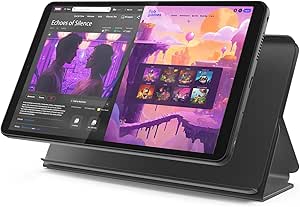
Lenovo Tab One Lightweight 8.7-Inch HD Tablet with Folio Case
Lenovo Tab One is the clear compact choice. Its 8.7-inch screen and lightweight design are easier to hold in one hand or place in a small bag than the 11-inch Samsung and AGM models. Up to 12.5 hours of streaming, fast charging, and an included folio case also suit travel, bedside listening, or relaxed viewing around the house.
Portability has a direct cost for senior use: less screen area means less room for large text, icons, and captions. The 480-nit display is bright, but its HD resolution and 60Hz refresh rate trail AGM’s FHD panel and Samsung’s smoother 90Hz screen. Lenovo’s 4GB of RAM, MediaTek Helio G85 processor, and 64GB storage are adequate for routine entertainment, but this is not the strongest choice for demanding games or extensive multitasking.
I rank it fifth because most seniors benefit more from a larger display than a smaller body. Still, this order should change for a buyer with good vision who finds an 11-inch tablet tiring to support. Dolby Atmos sound and the case’s stand reduce the need to hold it continuously. Choose Samsung for broader capability or AGM for larger reading space; choose Lenovo when low carrying weight and manageable dimensions decide the purchase.
Pros:- Compact dimensions make it easier to carry and hold
- Up to 12.5 hours of streaming supports long viewing sessions
- Included folio case doubles as a viewing stand
- Dolby Atmos speakers improve entertainment audio
Cons:- 8.7-inch display provides the least visual space in this group
- 4GB RAM and Helio G85 processor are aimed at routine tasks
- No stated cellular connectivity
Best for: A senior with good near vision who wants a smaller tablet for travel, streaming, audiobooks, and casual browsing.
Not ideal for: Anyone with reduced eyesight, limited fine-motor control, or a preference for the largest possible controls and captions.
- Display:8.7-inch HD
- Brightness:480 nits
- Refresh Rate:60Hz
- Processor:MediaTek Helio G85
- Memory:4GB RAM
- Storage:64GB
- Battery Life:Up to 12.5 hours of streaming
- Dimensions:211 × 124.8 × 8.5mm
- Included Item:Folio case
Our verdict“Lenovo Tab One is my compact pick for mobile seniors, but buyers with vision or dexterity challenges should choose a larger model.”

How We Picked
I judged these tablets through a senior-use lens, rather than ranking them by raw specifications alone. My first priority was how easily a person could read the display, identify controls, make a video call, and recover from a wrong tap. I also weighed sound quality, battery endurance, included protection, storage, and whether relatives could help with setup or content sharing.
I gave extra credit to large screens, clear interfaces, and useful safety features. Performance still matters because delays and unresponsive controls can make a tablet feel confusing, which helped Samsung take first place. At the same time, I penalized recurring fees, carrier restrictions, small displays, uncertain hardware details, and weak customer feedback. The resulting order reflects overall suitability for older buyers, not simply price or screen size. No single model wins every category: GrandPad offers more guardrails than Samsung, AGM supplies more storage for the money, and Lenovo trades visual space for portability.
Factors to Consider When Choosing Senior-friendly Tablets
I would start with the user’s eyesight, confidence, and main activities before comparing storage or speed. A tablet that feels manageable every day is a better purchase than a more powerful model whose controls create frustration.Match the Interface to the User
A conventional Android tablet offers more apps, but freedom also creates complexity. Samsung and AGM work well when the owner understands common touch controls or has help configuring the home screen. Pix-Star reduces that learning curve while retaining Google Play access. For someone who regularly taps suspicious messages or becomes lost in menus, GrandPad’s controlled environment may justify its recurring cost.
Choose Screen Size Around Vision and Grip
I favor an 11-inch screen for reduced eyesight because it leaves more room for enlarged text, roomy icons, and subtitles. Samsung and AGM lead here, while Pix-Star’s 10.1-inch panel remains comfortable for many users. Lenovo’s 8.7-inch screen is easier to carry, yet enlarging text can place less information on each page. A stand or folio can help someone with weak grip use a larger tablet without holding it.
Treat Responsiveness as an Accessibility Feature
Fast feedback helps a user understand that an action worked. Long pauses can lead to repeated taps, accidental commands, and confusion. Samsung’s 6GB RAM and 90Hz display make it the strongest disclosed performer here. Lenovo lists 4GB RAM and a Helio G85 processor, while AGM and Pix-Star provide less performance detail. I would favor better-documented hardware for frequent multitasking or long ownership.
Plan for Calls, Photos, and Sound
For family communication, camera placement and speaker clarity matter more than photographic detail. Samsung’s four Dolby Atmos speakers should make speech easier to hear, although its 5MP front camera is modest. GrandPad adds family sharing and protected calling, while Pix-Star supplies both front and rear cameras. I would pair any tablet with headphones when hearing needs are more pronounced and check that volume controls remain easy to reach.
Calculate the Full Ownership Cost
The purchase price is only part of the decision. GrandPad’s plan starts at $25 monthly or $275 annually, which can exceed the hardware cost over time. AGM includes a case and screen protector, and Lenovo supplies a folio, reducing immediate accessory spending. Samsung may need a separate case, but expandable storage can postpone replacement. I would also check return terms, warranty support, and who will provide setup help.
Frequently Asked Questions
What is the easiest tablet in this roundup for a senior who has never used one?
GrandPad is the easiest starting point for a person who needs large icons, guarded communication, and few distracting choices. Its scam protection also separates it from the standard tablets. The drawback is its paid-plan requirement and restricted system. If a subscription is undesirable, Pix-Star Touch is the alternative beginner pick, though its low customer rating calls for a careful return-policy check.
Which tablet is best for a senior with poor eyesight?
I would choose between the AGM PAD T2 and Samsung Galaxy Tab A11+. Both provide 11-inch screens, but AGM specifies a bright 500-nit FHD panel that is particularly attractive for reading. Samsung counters with smoother 90Hz motion and stronger disclosed performance. Whichever model wins, I would enlarge text, increase display contrast, and place only the most-used apps on the first home screen.
Does a senior-friendly tablet need cellular service?
No. Wi-Fi is enough for browsing, app-based calls, streaming, and photo sharing at home. Cellular access is useful when the owner travels or lacks dependable Wi-Fi, but the product details do not state cellular support for most models here. GrandPad uses its own locked service arrangement and does not work with other wireless carriers. I would match connectivity to where the tablet will actually be used.
How much storage should a senior’s tablet have?
64GB to 128GB is comfortable for routine use, including communication apps, books, and a moderate photo collection. The AGM PAD T2’s 256GB is better for downloaded films or a large family archive. Pix-Star’s 32GB is more restrictive, while Samsung’s 128GB plus expansion offers the most flexible path. Cloud photo services can reduce local needs, but they add account management and dependence on internet access.
Can a regular Android tablet be made easier for an older adult?
Yes. I would increase the font and display size, enable higher contrast where helpful, remove unused icons, place key contacts and apps on the first screen, and set a longer screen timeout. A sturdy case with a stand can also improve grip and viewing posture. These adjustments make Samsung and AGM much more senior-friendly, though they do not reproduce GrandPad’s built-in scam controls or managed interface.
Conclusion
For most buyers, I recommend the Samsung Galaxy Tab A11+. It has the best mix of a large screen, smooth operation, strong speakers, storage flexibility, and room to grow. I would choose GrandPad for a vulnerable or very hesitant user who benefits from scam protection and family participation, provided the ongoing plan fits the budget.
The AGM PAD T2 is the better value for reading, media, and large local storage, while Pix-Star suits a beginner who wants a simplified interface plus Google Play access and can accept its weaker customer feedback. Lenovo Tab One belongs with the frequent traveler or anyone who values a light, compact device above maximum readability. The right choice comes down to whether simplicity, visibility, safety, or portability matters most in daily use.
Cold & flu season Picks
humidifiers
As an affiliate, we earn on qualifying purchases.